Take App is one of the better-known ways to turn a product list into orders on WhatsApp, and plenty of small sellers start there. But it isn't the only option, and depending on what you sell, how many orders you get and whether you need online payments, something else may fit better.
This post compares the Take App alternatives I'd actually look at for WhatsApp ordering, including Nice Catalogs (the tool I build, so read that section knowing who wrote it). Every price and feature below comes from each vendor's own website, which I checked on November 5, 2026. Prices change, so open the links before you decide.
The short answer
- Nice Catalogs if you want a themed catalog or menu with a WhatsApp (or Telegram) cart, no order limits and no commission, for a flat $5 or $10 a month, plus reviews and loyalty cards later.
- The free WhatsApp Business catalog if you sell a handful of items, already chat with every customer and don't need a link that works outside WhatsApp.
- Menubly if you run a restaurant and want a free menu-and-links mini website to start.
- OlaClick if you run a restaurant and want a full system: point of sale, kitchen display, delivery and a WhatsApp chatbot.
- Stay on Take App if you need customers to pay online at checkout, delivery fees by distance, or a team inbox.
What Take App gives you (so you know what you're replacing)
According to Take App's pricing page :
- Basic is $0 and includes unlimited products, no commissions and local payment methods. It saves 50 orders a month to your dashboard. After that, orders still reach your registered WhatsApp number, but they aren't saved to the dashboard that month.
- Essential is $29 USD a month: unlimited orders and images, a custom domain, delivery fees by distance and weight, CSV import and export, analytics, SEO and Meta Pixel.
- Business is $50 USD a month: card payments through gateways like Stripe, WhatsApp automation and broadcasts, a WhatsApp and Instagram inbox, customer login, Take App logo removal, more stores and staff, and an API with webhooks.
- Take App says it charges no commission on orders, and that payment providers charge their own processing fees.
So the real question is usually one of these: you've outgrown 50 saved orders and $29 a month feels like a lot for what you use, you don't need online payments, or you want something built for your type of business.
1. Nice Catalogs: a themed catalog with a WhatsApp cart
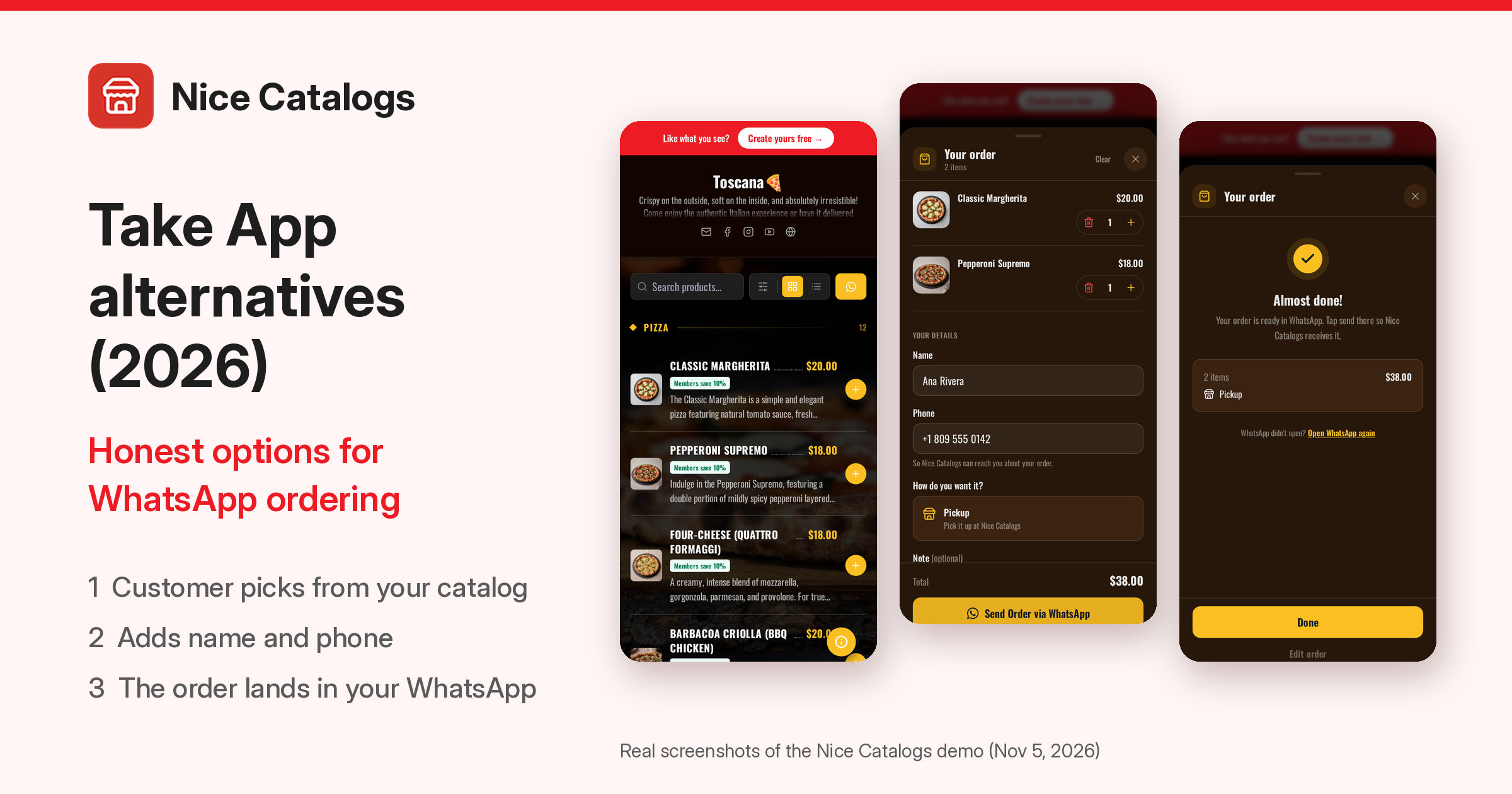
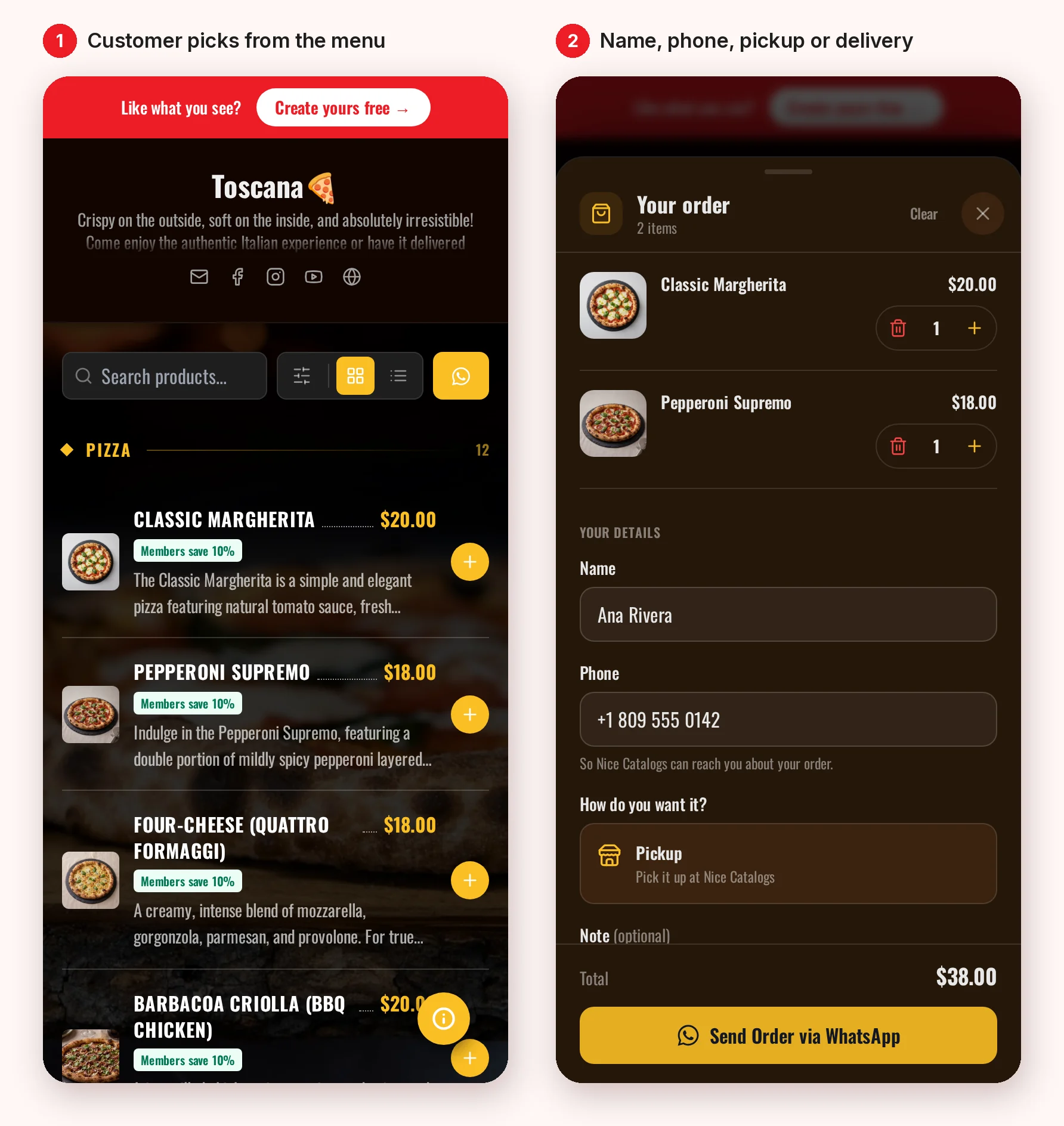
Nice Catalogs turns your products or menu into a catalog with its own link and QR code. Customers browse it in their phone's browser, tap what they want into a cart and send the order to your WhatsApp as one itemised message. They don't install an app or create an account.
Here's the flow on the public Toscana demo, captured today at full resolution:
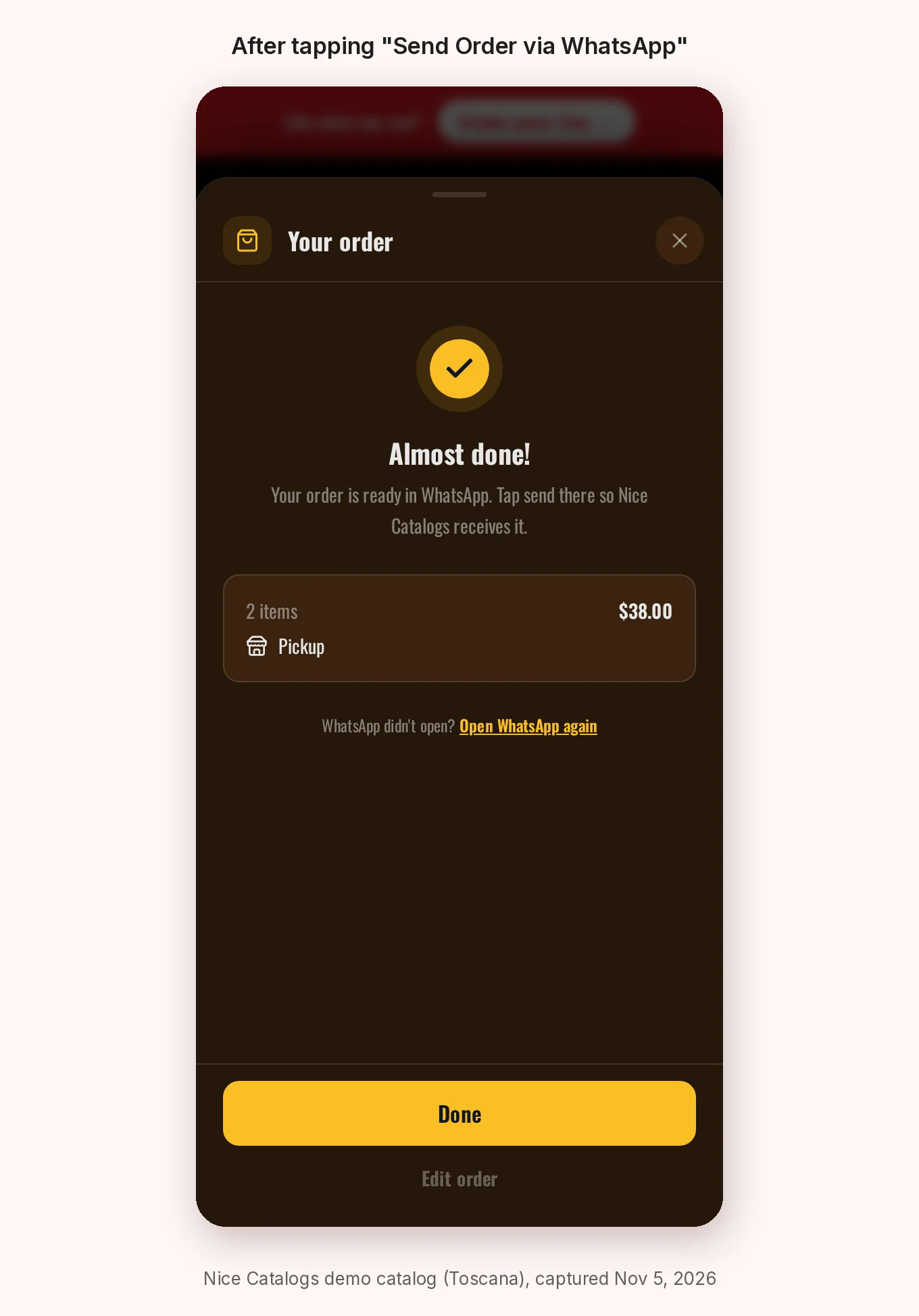
When the customer taps Send Order via WhatsApp, the catalog opens WhatsApp with the order already written. The "Almost done!" screen reminds them to tap send in WhatsApp so the order actually reaches you.
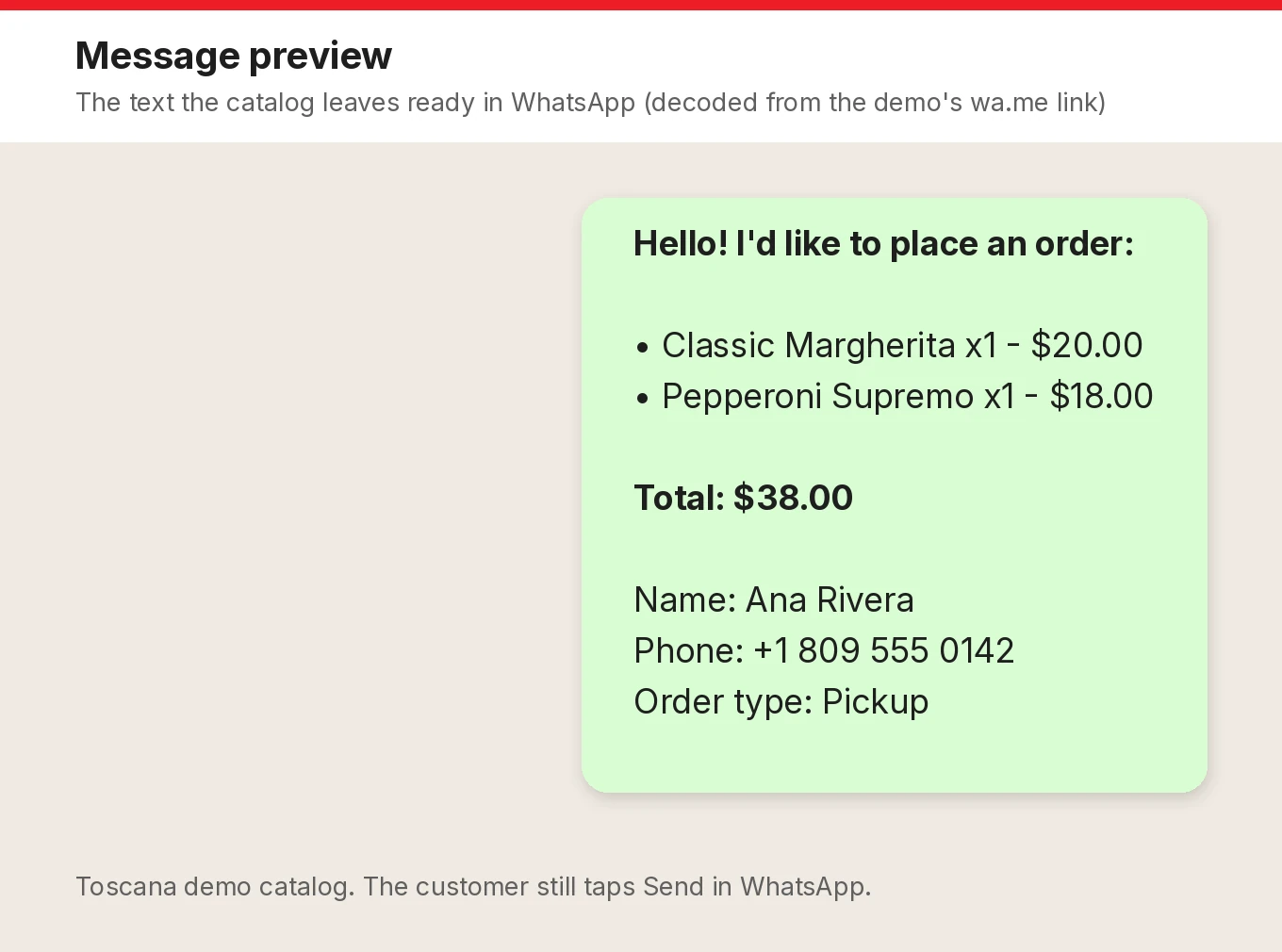
This is the exact message the demo prepared, decoded from the WhatsApp link it opened:
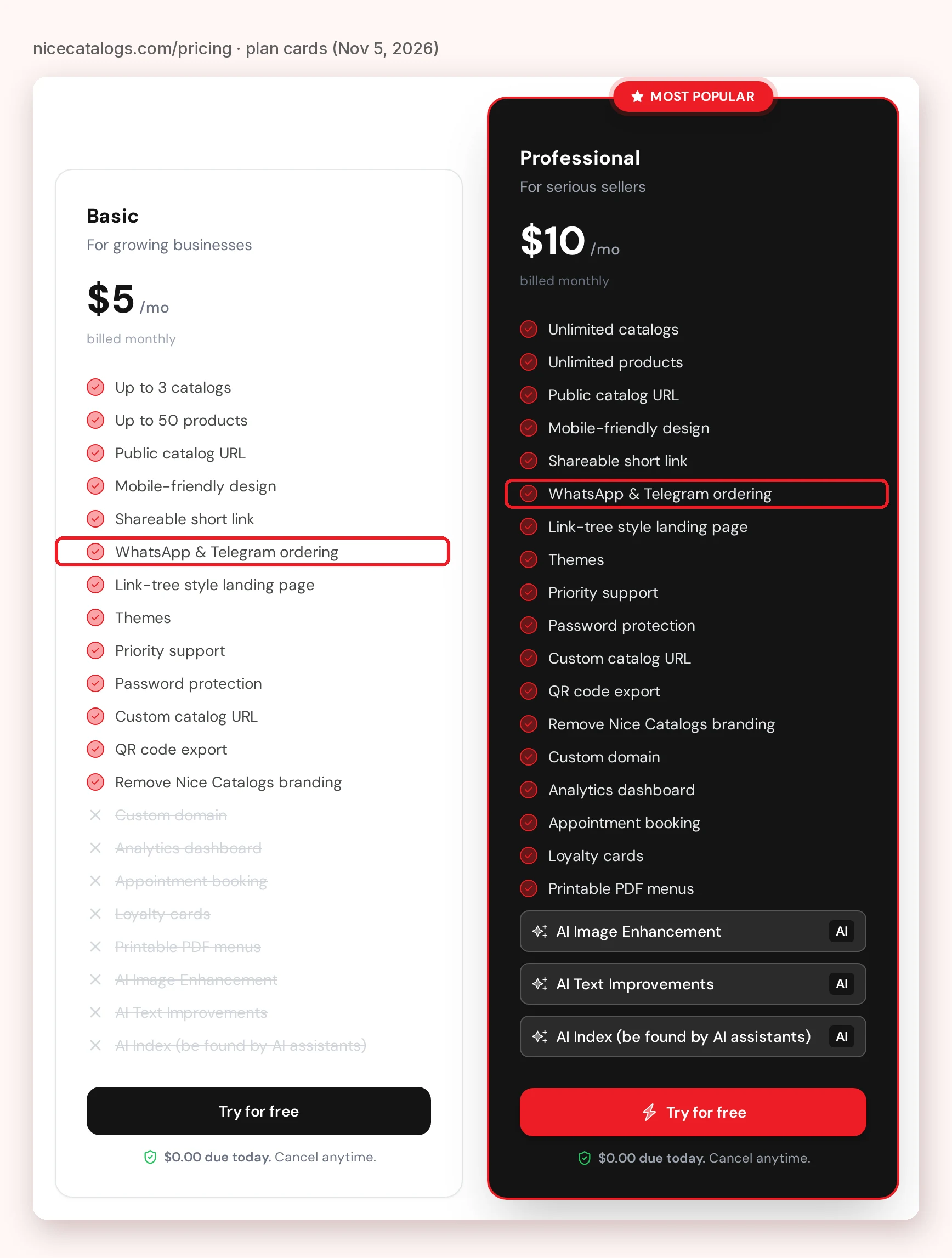
What it costs, from the pricing page :
- Basic, $5 a month: up to 3 catalogs and 50 products per catalog, with WhatsApp and Telegram ordering, QR code export, password protection and a link-tree style landing page.
- Professional, $10 a month: unlimited catalogs and products, plus a custom domain, an analytics dashboard, appointment booking, loyalty cards, printable PDF menus and the AI features.
- Yearly billing takes 20% off ($4 or $8 a month). Every plan starts with a 7-day free trial: you add a card, $0.00 is charged today, and you're charged on day 7 unless you cancel before then.
Where it beats Take App: there's no monthly cap on orders and no fee per order on either plan, so a busy month costs the same as a quiet one. The themes are made for restaurants, cafés, bars, hotels and retail, and the WhatsApp ordering works with any WhatsApp account, personal or Business. On Professional you also get things I couldn't find on Take App's site, like Apple Wallet and Google Wallet loyalty cards and a printable PDF version of your menu. Our Take App alternative page has the one-to-one feature comparison.
Where Take App is stronger: Nice Catalogs takes the order, not the payment. You settle payment in the chat the way you already do (cash, transfer, card on pickup or a payment link). If you need customers to pay by card before you see the order, or delivery fees calculated by distance, Take App's paid plans do that and Nice Catalogs doesn't.
If you want the full setup step by step, I wrote a guide on how to run a product catalog and take orders on WhatsApp .
2. The free WhatsApp Business catalog
If you already use the WhatsApp Business app, it has a catalog built in, and it's free. From WhatsApp's own help pages ( about shopping on WhatsApp and how to create and maintain a catalog ):
- Each item has a title and optional price, sale price, description, website link and product code. Adding prices is only available in certain countries.
- Customers add items to a cart and send it to their chat with you, then you discuss payment there.
- Every image goes through a review, and an item only becomes visible to customers after WhatsApp approves it.
Good fit if you sell a small range and every sale already happens in a chat. Less good if you want a link you can post on Instagram, Google or a printed QR code that people can browse without opening WhatsApp, or you need categories with many items and quick price changes. I went into the trade-offs in more detail in this WhatsApp Business catalog alternative guide for shops .
3. Menubly: a free mini website for restaurants
Menubly is built for restaurants, cafés, bars, bakeries and food trucks. Its pricing page lists:
- Free, $0 a month: a mini website with unlimited links, a built-in online menu, a QR code menu and online ordering for pickup and delivery.
- Pro, $9.99 a month (or $95.99 a year): adds full menu customization, help converting a PDF menu, a custom domain and custom menu design.
- A 30-day free trial with no credit card, and no commission on orders.
The Menubly homepage lists WhatsApp ordering ("accept orders through WhatsApp messaging") and WhatsApp notifications for new orders. The pricing page doesn't say which plan includes WhatsApp ordering specifically, so check that before you sign up.
Good fit if you run a food business and want a free starting point. Less good if you sell products rather than food, since everything on the site is aimed at restaurants.
4. OlaClick: a full restaurant system with WhatsApp orders
OlaClick goes much further than a menu: its pricing page says every plan includes a point of sale, a digital menu and a CRM, and its plan comparison lists extras like a kitchen display, inventory, delivery management and a WhatsApp chatbot with AI.
- Advanced: listed at US$9.90 a month, with a limit of 75 orders a month ("orders in OlaClick and WhatsApp"). US$12.00 is shown next to it.
- Premium: US$25.00 a month, 400 orders a month.
- Elite: US$59.00 a month, and Impulso: US$160.00 a month, both with unlimited orders.
- The page notes that those prices are for annual subscriptions paid in full at purchase. The OlaClick homepage says you can start free, with no commission per sale and no credit card.
Good fit if you run a busy restaurant and want ordering, the till and the kitchen in one system. Less good if you only need a menu people can order from, because you'd be paying for (and learning) much more than that. Watch the monthly order limits on the lower plans, too.
What about Shopify?
If what you really need is a full online store with checkout, shipping and inventory, Shopify is the usual answer, and it's a different kind of tool. Its pricing page showed the Basic plan at $25 USD a month ($22 billed yearly) when I checked. For a menu or a small catalog that sells through WhatsApp it's usually more than you need; our Shopify comparison covers when each one makes sense.
How to choose
Ask yourself these four questions:
- Do customers need to pay online before you see the order? If yes, look at Take App's paid plans, OlaClick or Shopify. If you're happy to settle payment in the chat, a catalog with a WhatsApp cart is simpler and cheaper.
- How many orders do you get a month? Take App's free plan saves 50 to the dashboard and OlaClick's lower plans cap orders at 75 or 400. Nice Catalogs and Menubly don't list an order cap.
- Is it a restaurant or something else? Menubly and OlaClick are built for food. Nice Catalogs and Take App work for both food and retail.
- What happens after the first order? If you want reviews and repeat customers, check what each tool includes. In Nice Catalogs, review requests are in every plan, and the Apple Wallet and Google Wallet loyalty cards are on Professional.
Whatever you pick, you can try it for free first. You can browse the Nice Catalogs demo without signing up, and if you decide to try it, start a 7-day trial .
A free extra: your Google review link
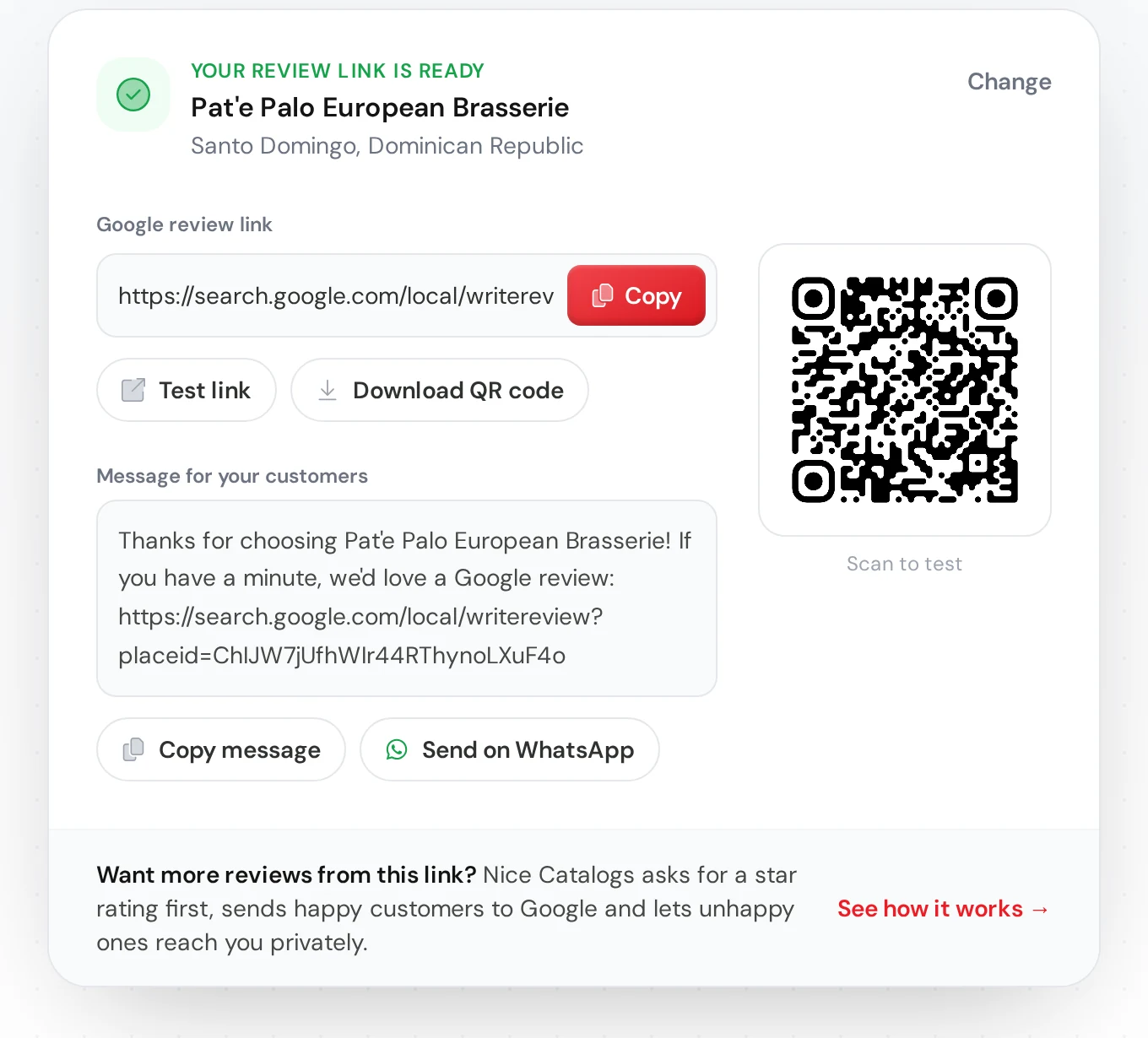
More orders usually means more happy customers, and that's the moment to ask for a review. Whichever ordering tool you choose, our free Google review link generator gives you a direct link to your review box, a QR code and a ready-made message to paste in the WhatsApp chat after each order. No sign-up needed.
FAQ
Is there a free Take App alternative?
Yes. The WhatsApp Business app catalog is free, and Menubly has a free plan for restaurants. Take App itself also has a free plan that saves 50 orders a month to the dashboard. Nice Catalogs isn't free: it starts at $5 a month after a 7-day trial.
Which Take App alternative has no commission on orders?
All the tools in this post say they don't take a commission on orders: Nice Catalogs, Menubly and OlaClick on their own sites, and Take App on its pricing page. Payment processors still charge their own fees when you take card payments.
Can I take orders on WhatsApp without the WhatsApp Business app?
With Nice Catalogs, yes: orders arrive through a standard WhatsApp link, so any WhatsApp account works, personal or Business. The built-in WhatsApp catalog, on the other hand, is part of the WhatsApp Business app.
Can customers pay online with Nice Catalogs?
Not through the catalog. Nice Catalogs sends you the order and you agree payment in the chat. That's also why there's no fee per order. If online payment at checkout is a must, Take App's Business plan or a full store like Shopify is a better fit.