Order Tiger is a complete restaurant ordering system: a branded ordering website, apps, QR table ordering with card payments, a till for the counter, delivery dispatch and loyalty, all priced per location. For a busy restaurant with staff, a kitchen printer and drivers, that can be exactly right. For a small pizzeria, café or food stand that mostly takes orders by message, it can be a lot more system than the day needs.
This post is an honest look at Order Tiger alternatives for small restaurants: what Order Tiger includes and costs according to its own website, when it is the better choice, and what a lighter setup looks like. We build Nice Catalogs, so read that part knowing who wrote it. Every Order Tiger and Take App detail below comes from their own pages, which we checked today, November 24, 2026, and our own plans come from our pricing page , checked the same morning. Prices change, so open the links before you decide.
The short answer
- Stay with Order Tiger (or pick it) if you want guests to pay by card when they order, tickets printed in the kitchen, a till for counter and phone orders, delivery drivers dispatched for you, or one system for several locations.
- Pick Nice Catalogs if you mainly need a good-looking menu with its own link and QR code, and orders that arrive in WhatsApp or Telegram, for a flat $5 or $10 a month with no fee per order. Payment stays the way you already take it.
- Look at Take App if you want a WhatsApp store with online payments and delivery fees, and you are fine with its order limits on the free plan or its higher monthly price.
What Order Tiger includes (from its own pages)
According to Order Tiger's pricing page , checked November 24, 2026, plans are per location, billed monthly, with no contract. The US prices shown are:
- Online Ordering, $69 a month: a branded web ordering widget, QR table ordering and click-to-collect, an admin dashboard, real-time analytics, an order management app, coupons and discounts, delivery fleet integrations, online card payments, free menu setup and 24/7 support.
- EPOS, $49 a month: a till for counter and phone orders, with receipts and kitchen tickets printed automatically, stock control and sales reports, without online ordering.
- Online Ordering + EPOS, $109 a month: both, in one order flow and one sales report. The page marks this one as the most popular.
- Growth, $299 a month: everything above plus a loyalty program and automated email, SMS and push marketing.
The same page lists add-ons per location, per month: branded iOS and Android ordering apps ($29), a loyalty program ($29), table reservations ($29) and automated marketing ($69). EPOS hardware such as Sunmi tills, printers and PAX card terminals is a one-off purchase with pricing on request. Online card processing runs through Stripe, at Stripe's rates in the US and internationally. The UK and EU versions start at £59 and €59.
On its home page , Order Tiger describes itself as an online ordering system and EPOS for restaurants, with no commission on orders. Its QR table ordering page says guests scan, order and pay from the browser, and orders arrive tagged with the table number and go to the kitchen or bar. To get started, the pricing page sends you to book a demo, and a member of their sales team contacts you.
So for one location, the starting point is $69 a month for online and QR ordering, or $109 if you also want the till.
When Order Tiger is the right choice
We'd rather you pick the right tool than ours. Order Tiger, or a system like it, makes more sense when:
- Guests should pay when they order. Card payments, Apple Pay and Google Pay at checkout are part of its online ordering package.
- Your kitchen runs on printed tickets or a kitchen screen. Orders routed to the kitchen or bar by table number save real time on a full floor.
- You take phone and counter orders too. A till that puts online and in-store orders in one report is what EPOS is for.
- You deliver but have no drivers. Its delivery fleet integrations dispatch orders to on-demand drivers.
- You have several locations and want menus and reports for all of them in one dashboard.
If two or three of those describe your restaurant, a lighter tool will feel limited, and the per-location price buys real work.
When you don't need a full POS
Plenty of small restaurants don't have that setup. One person answers the phone and WhatsApp, the owner cooks, customers pay cash or by transfer when they pick up, and most orders already arrive as messages. What they actually need is:
- A menu that looks good on a phone, with photos and prices that are easy to change.
- A link and a QR code for the table, the counter, Instagram and WhatsApp.
- Orders that arrive written out, so nobody has to type them back or guess "the big one with the extra cheese".
- A monthly price that doesn't grow with every order.
That's the space where an alternative to Order Tiger makes sense.
Nice Catalogs: a menu link that takes the order
Nice Catalogs turns your menu into a catalog with its own link and QR code. Guests open it in the phone's browser, tap dishes into a cart and send the order to your WhatsApp or Telegram as one itemised message. They don't download an app or create an account.
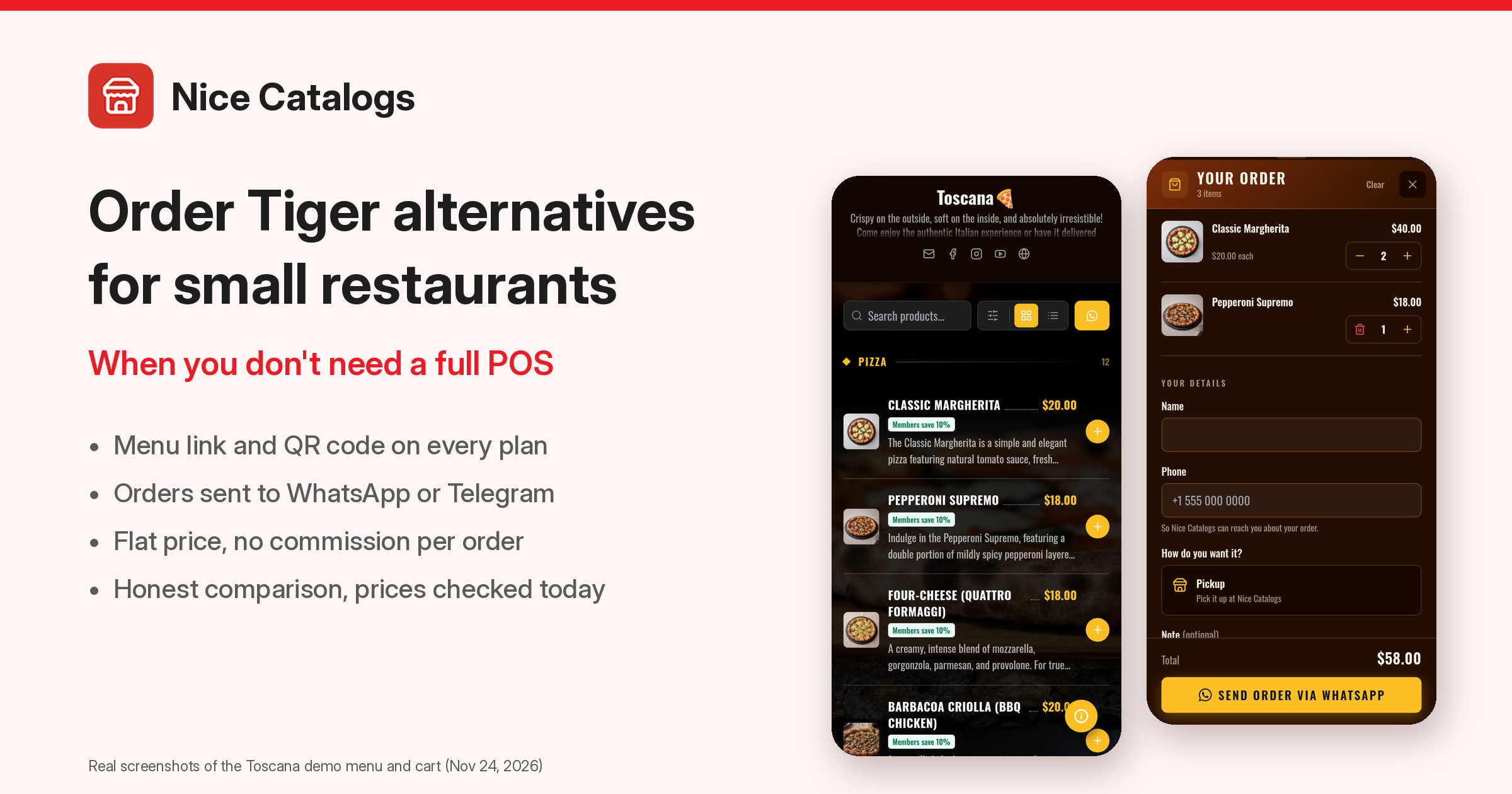
Here's how it looks on the public Toscana demo menu , captured today on a phone:
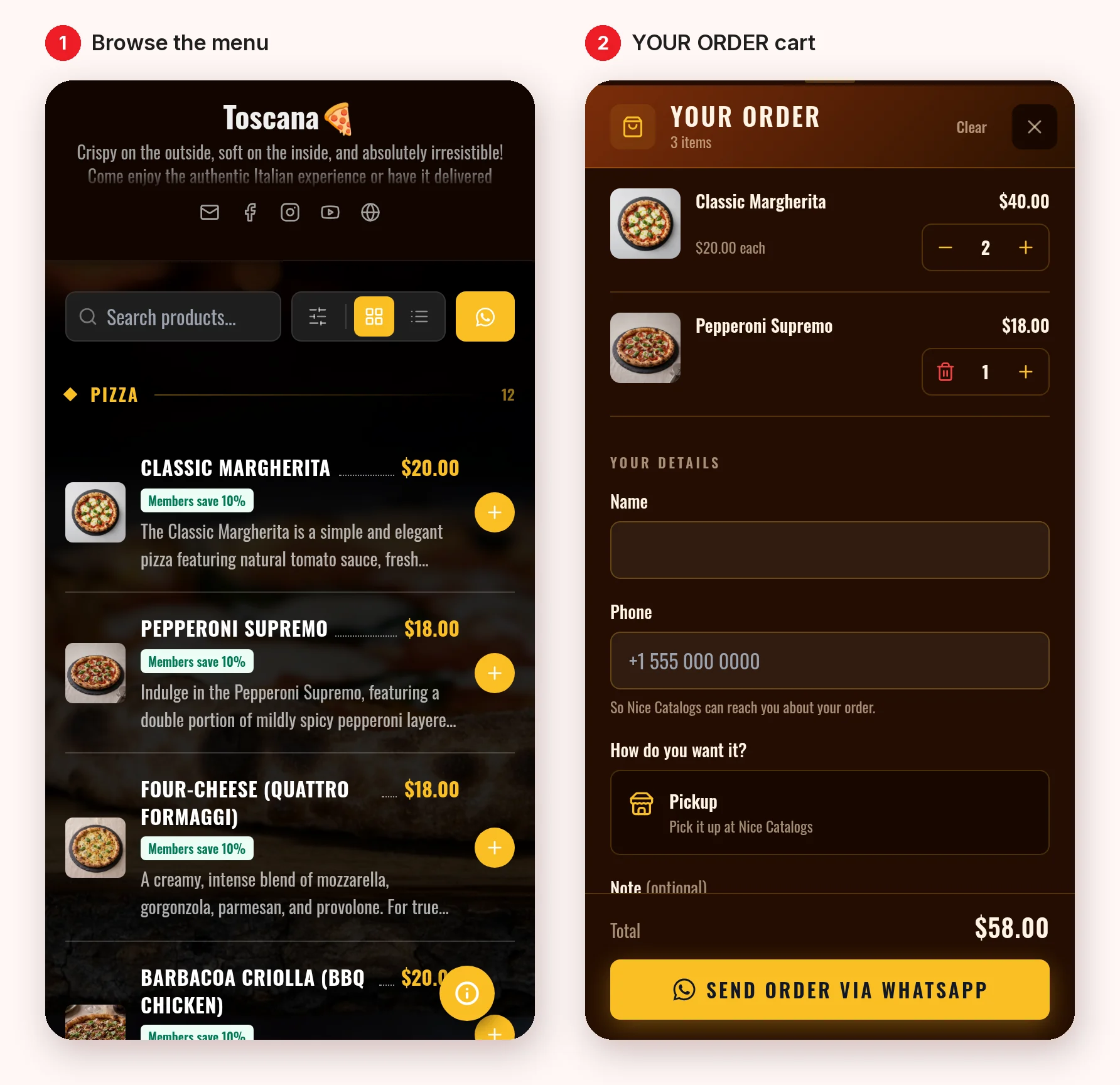
The guest adds dishes, opens YOUR ORDER, adds a name and phone number, picks pickup and taps Send Order via WhatsApp. WhatsApp opens with the order already written, and the guest presses send. Our WhatsApp ordering page explains it step by step: any WhatsApp account works, personal or Business, because orders go through a standard wa.me link.
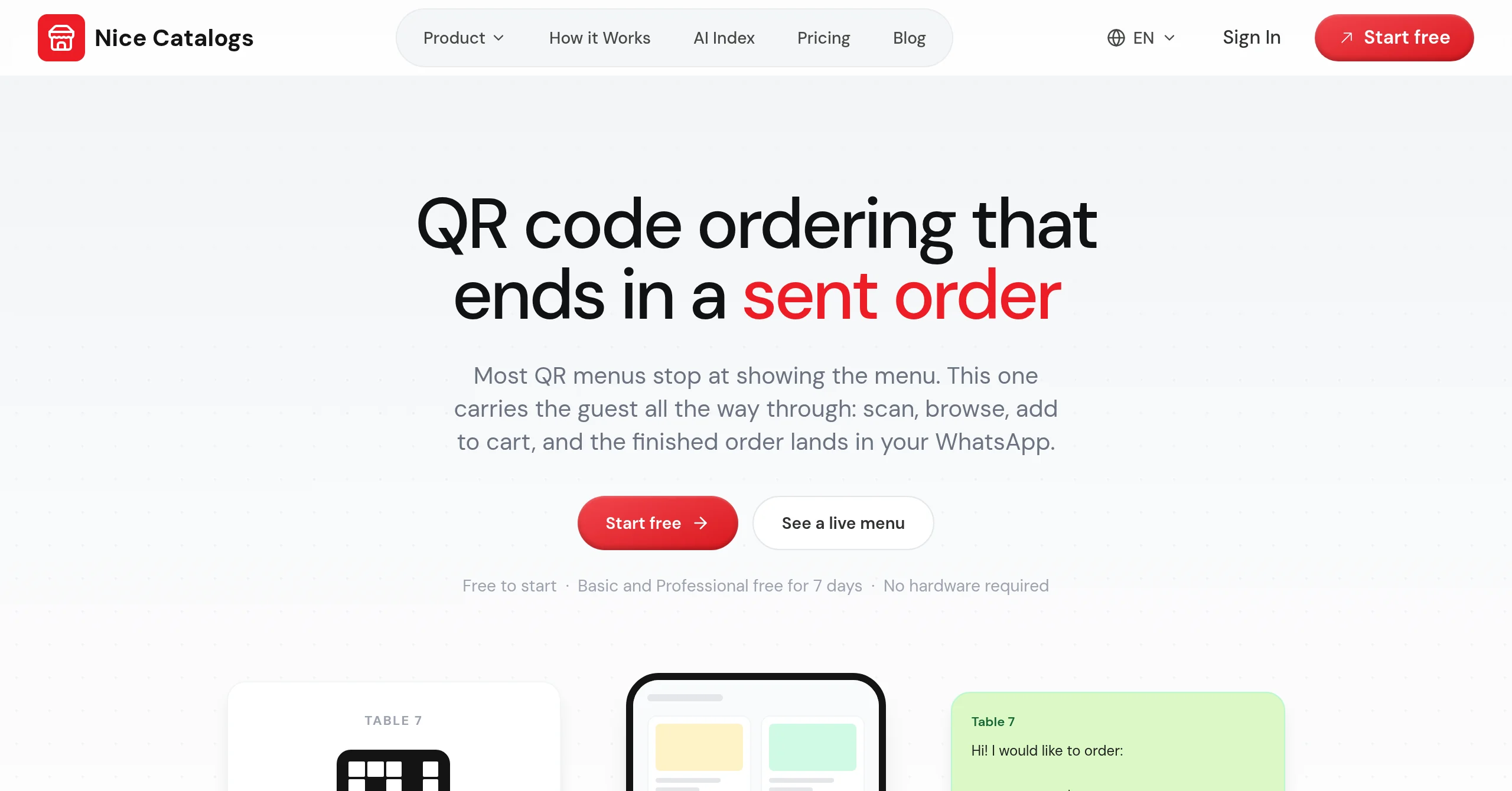
The same catalog works at the table. Print the QR code that comes with your menu, and guests scan, browse and send the order from where they sit. That's what our QR code ordering page covers:
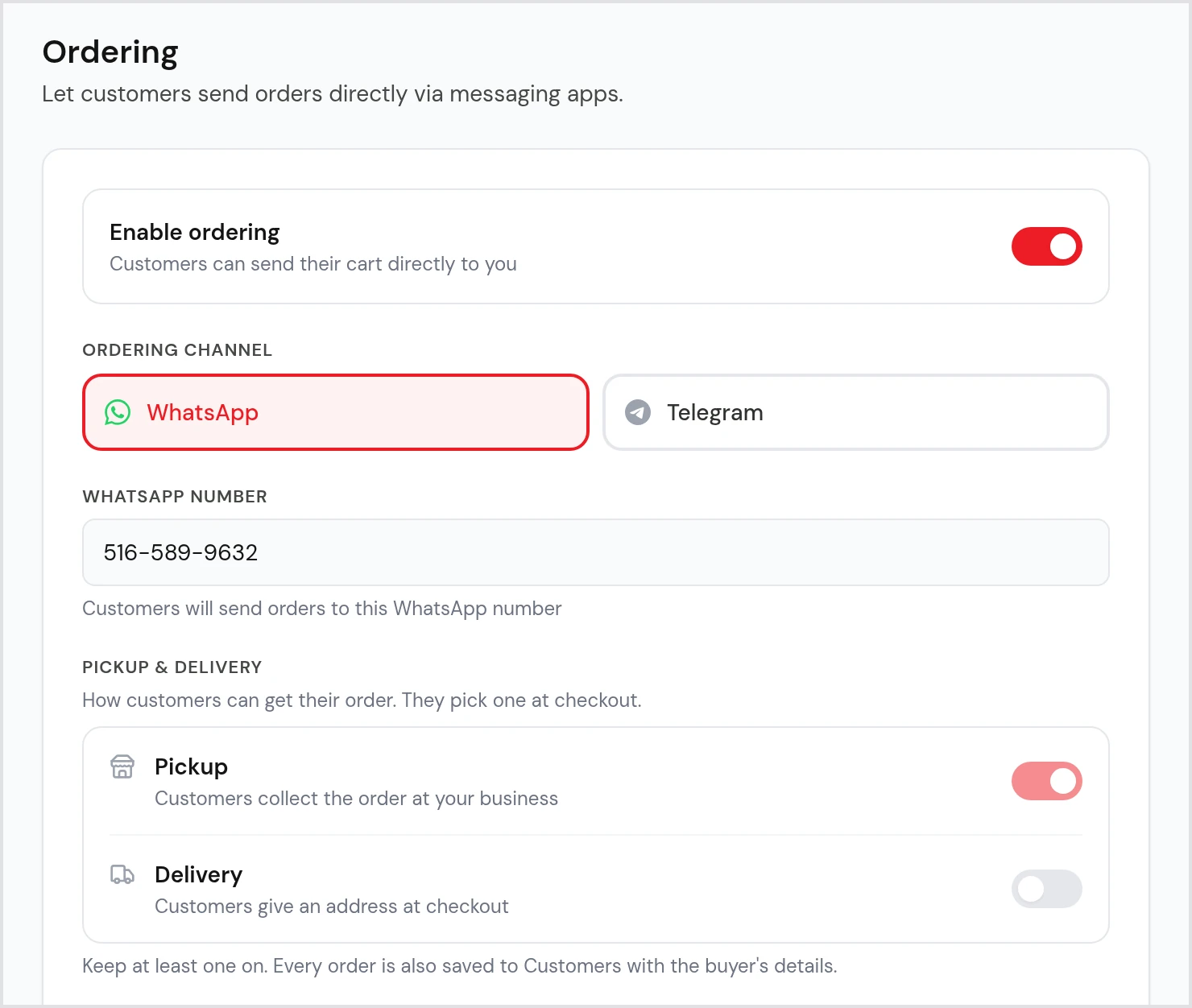
Turning ordering on is one switch in your catalog settings: choose WhatsApp or Telegram, enter the number and decide whether you offer pickup, delivery or both.
What it costs
From our pricing page , checked November 24, 2026:
- Free, $0 forever, no credit card: 1 catalog with up to 25 products, a public catalog URL, every theme and QR code export. Public pages show a small "Powered by Nice Catalogs" badge. Ordering is not included on Free.
- Basic, $5 a month: up to 3 catalogs and 100 products per catalog, WhatsApp and Telegram ordering, appointment booking, a link-in-bio landing page, Google reviews tools, password protection and no Nice Catalogs branding.
- Professional, $10 a month: unlimited catalogs and products, a custom domain, an analytics dashboard, loyalty cards, printable PDF menus, the customer list and saved orders (our Orders dashboard) and the AI features.
Basic and Professional come with a 7-day free trial. The Free plan doesn't need one. Paying yearly takes 20% off, which works out to $4 or $8 a month.
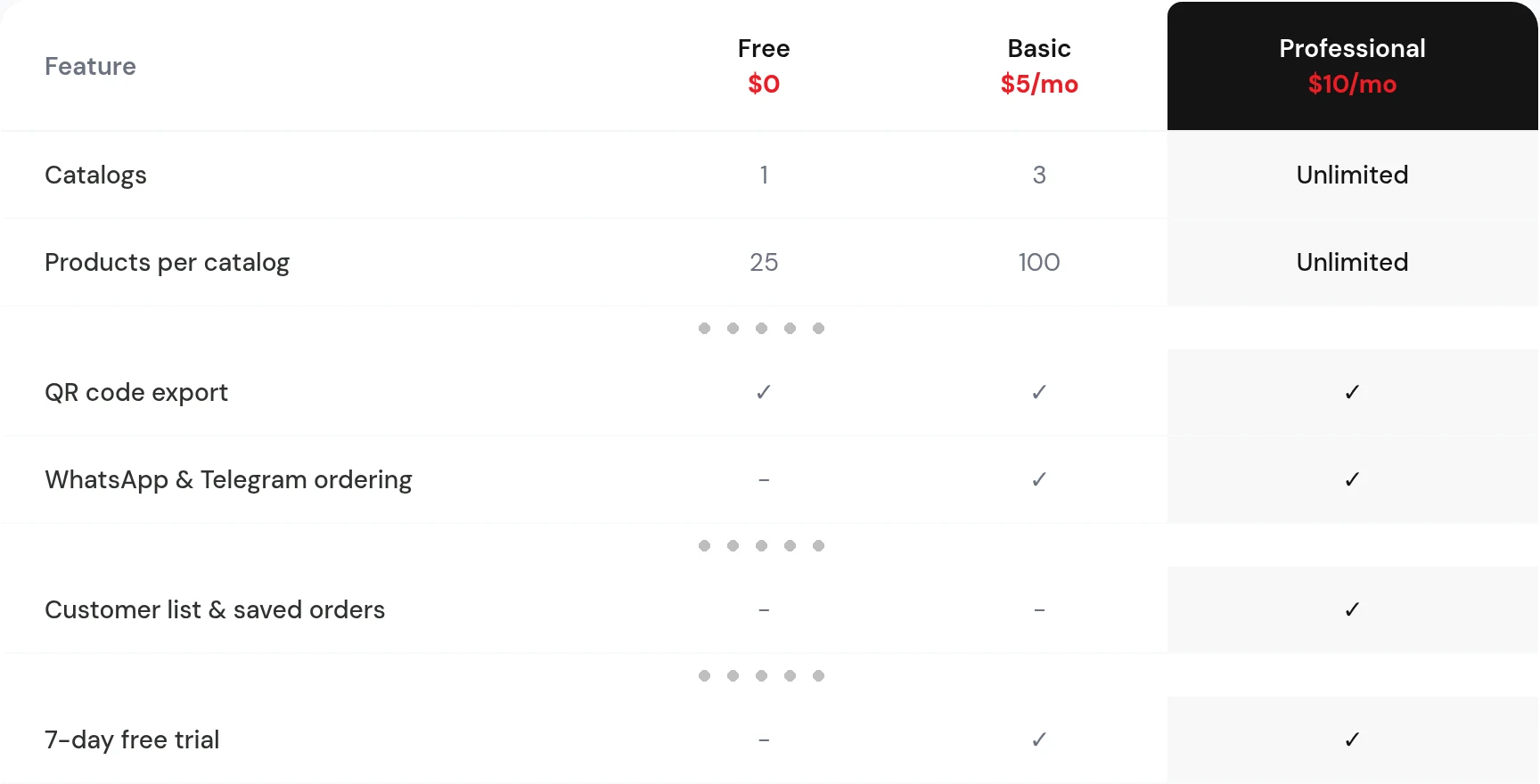
The Orders dashboard is a Professional feature. On Basic, orders arrive in your chat. On Professional, they are also saved in your dashboard together with a customer list. If you want a routine for confirming, tracking and following up on chat orders either way, our guide on how to manage WhatsApp orders walks through it.
The trade-off, said plainly
Nice Catalogs takes the order, not the payment. There is no card checkout in the catalog, so guests pay the way they already do with you: cash, card on pickup, a bank transfer or a payment link you send in the chat. There's also no kitchen printer, no till and no delivery dispatch. If you need those, Order Tiger's plans include them and ours don't.
What you get in exchange is a much smaller bill and less setup. For one location, Basic is $5 a month against Order Tiger's $69 starting plan, with no fee per order on either side. You can build the menu yourself from your phone, and our page for restaurants shows what a restaurant menu on Nice Catalogs includes.
Order Tiger vs Nice Catalogs at a glance
- Monthly price for one location: Order Tiger from $69 (online ordering) or $109 (with EPOS). Nice Catalogs $0, $5 or $10, with ordering from $5.
- Fee per order: neither charges a commission on orders, according to both websites. Order Tiger card processing is billed at Stripe's rates.
- Card payment when ordering: Order Tiger, yes. Nice Catalogs, no: payment is agreed in the chat.
- Where the order lands: Order Tiger, its order management app, till or kitchen. Nice Catalogs, your WhatsApp or Telegram chat, and on Professional also the Orders dashboard.
- Hardware: Order Tiger offers tills, printers and card terminals as a one-off purchase (optional for online ordering). Nice Catalogs needs none: your phone is the order screen.
- Setup: Order Tiger's team sets up your menu for free, and you start by booking a demo. With Nice Catalogs you sign up and build it yourself, with a free plan to start.
- QR code at the table: both. Nice Catalogs includes QR code export on every plan, Free included.
Another alternative worth a look: Take App
If the reason you're looking past Order Tiger is price, but you still want guests to pay online, Take App's pricing page (checked November 24, 2026) shows three plans:
- Basic, $0: unlimited products, no commissions, local payments, and 50 orders a month saved to the dashboard. After 50, orders still reach your WhatsApp but aren't saved that month.
- Essential, $29 USD a month: unlimited orders and images, a custom domain, delivery fees by distance and weight, CSV import and export, analytics.
- Business, $50 USD a month: card payments through Stripe and others, WhatsApp automation and broadcasts, a WhatsApp and Instagram inbox, multiple stores and staff, and logo removal.
So card payments on Take App sit on the $50 plan. We compared the two in more detail on our Take App alternative page , and our roundup of Take App alternatives covers more options.
And if you landed here while comparing QR menu tools with a similar name, our page on Menu Tiger alternatives compares that one separately.
How to choose in five questions
- Do guests need to pay by card before you see the order? If yes, Order Tiger or Take App Business. If no, a menu link with chat ordering is enough.
- Do orders need to print in the kitchen? If yes, look at an EPOS. If one person reads them on a phone, you don't need one.
- Do you deliver with your own people or not at all? Then delivery fleet integrations are a cost you won't use.
- How many locations do you run? Per-location pricing adds up quickly. One small location is where flat, low pricing helps most.
- What's your budget per month? Compare $69 to $109 per location against $5 or $10, and be honest about which features you'd use in the first three months.
If your answers are mostly "no", start small. You can always move to a bigger system when the restaurant needs it. If you're new to menus with QR codes, our guide to QR code menus for restaurants covers the basics.
Reviews after the order
Order Tiger lists ratings and reviews and loyalty among its growth tools, and the loyalty program is a paid add-on or part of the $299 Growth plan. If what you want right now is simply more Google reviews from happy guests, there's a free way to start.
Our free Google review link generator gives you a link that opens your Google review box in one tap, a QR code to print and a ready-made message for WhatsApp. It's free, with no sign-up, and the link keeps working even if you never use Nice Catalogs.
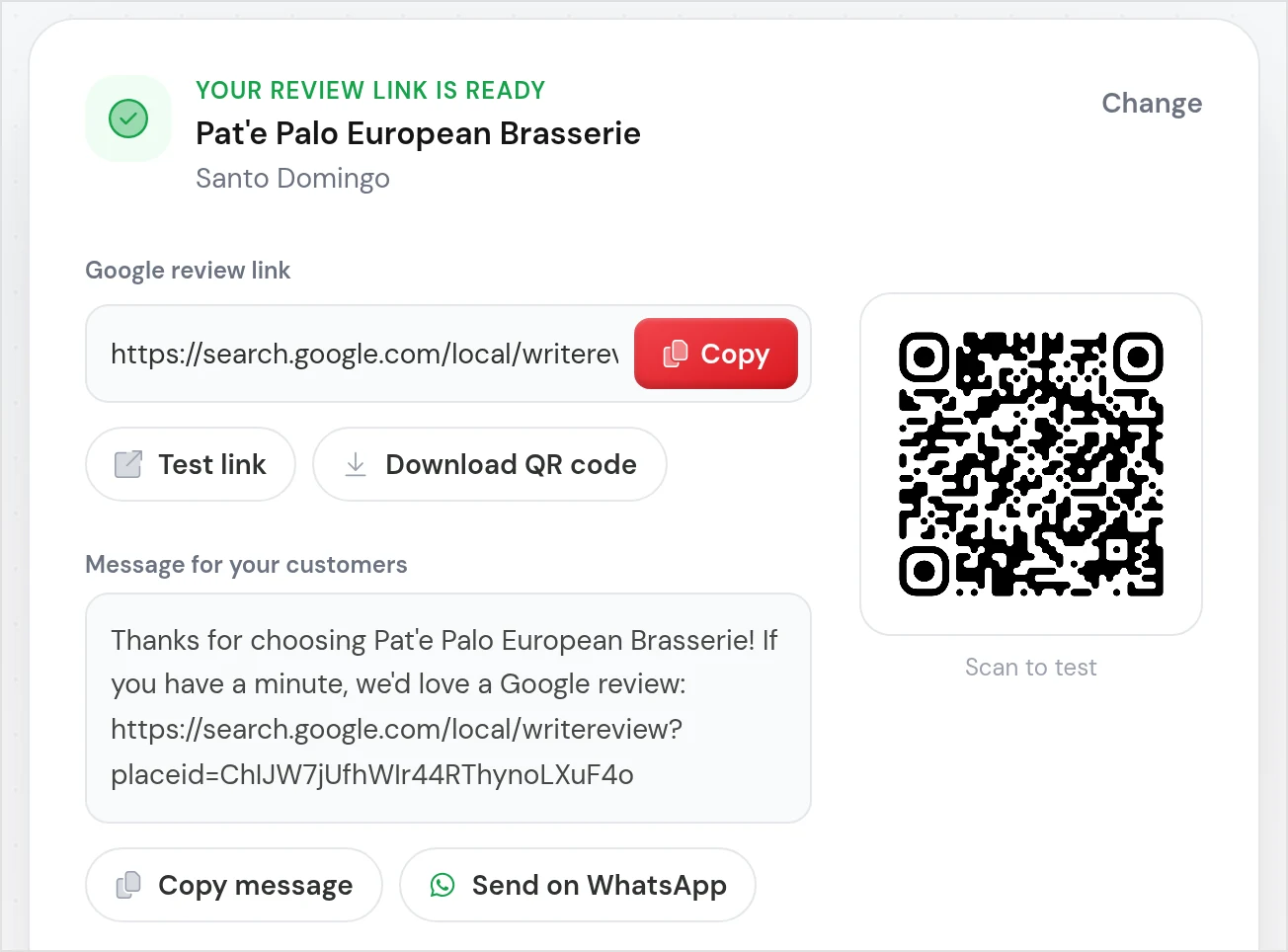
A simple habit works well with chat orders: when the order is ready or delivered, send the review message in the same WhatsApp chat. Put the QR code on the counter and on the receipt for guests who pick up.
Questions people ask
Is there a free alternative to Order Tiger?
Nice Catalogs has a Free plan with 1 catalog (your menu), up to 25 products and a QR code, at $0 with no credit card. Ordering by WhatsApp or Telegram starts on Basic at $5 a month, with a 7-day free trial. Take App also has a free plan with 50 saved orders a month.
Can I take card payments with Nice Catalogs?
Not in the catalog. The order arrives in your chat and you settle payment the way you already do, including sending a payment link in the chat. If card payment at checkout is a must, Order Tiger includes it in its online ordering package.
Do my guests need an app to order?
No. With Nice Catalogs the menu opens in the phone's browser and the order goes through the WhatsApp or Telegram they already have. Order Tiger's QR table ordering page also says no app or account is needed to order at the table.
Can I try Nice Catalogs before paying?
Yes. You can start free and build your menu on the Free plan, then try Basic or Professional free for 7 days when you want ordering. Or open the Toscana demo first and add a few dishes to the cart to see how it feels for a guest.
The bottom line
Order Tiger is built for restaurants that want online payments, a till, kitchen tickets, delivery dispatch and marketing in one paid system, and its pricing page is clear about what each plan costs per location. If that's you, it's a solid option. If your restaurant mostly needs a menu people can open from a link or a table QR code, and orders that land in WhatsApp written out, you don't need a full POS to get there. Start free with Nice Catalogs , turn on ordering when you're ready, and see how far a simple setup takes you.