A digital reward card is the paper punch card's replacement: the same "come back and get something" deal, kept on your customer's phone. The worry most small businesses have is the app. Nobody wants to download one to get a free coffee, and a program that asks for it loses people at the counter.
The good news is that a digital reward card doesn't need an app at all. In this guide we explain how no-app reward cards work, how to choose between points and a member discount, where customers actually find the card, and what "free" really means when you shop for loyalty tools. We build Nice Catalogs , which includes a digital loyalty card, so we use our own screens as the example. Everything about our product below comes from our live pages and real screenshots from our demo account.
What is a digital reward card?
A digital reward card is a loyalty card that lives on the customer's phone. Each customer gets a card with their name and a short member code. When they visit, you recognise the code, record the visit, and give them the reward when they've earned it.
You'll see the same idea called a digital loyalty card, a digital punch card, a member card or a rewards card. The name matters less than three practical questions:
- What does the customer have to do to join? The fewer steps, the more regulars you sign up.
- What do you have to do at the counter? It has to be quick on a busy morning.
- What does it cost? Per month, and per member if the tool charges that way.
Why "no app to download" matters
Think about the moment you offer the card: the customer is paying, maybe with someone waiting behind them. If joining means finding an app in the store, downloading it, creating an account and picking a password, most people will say "next time", and next time rarely comes.
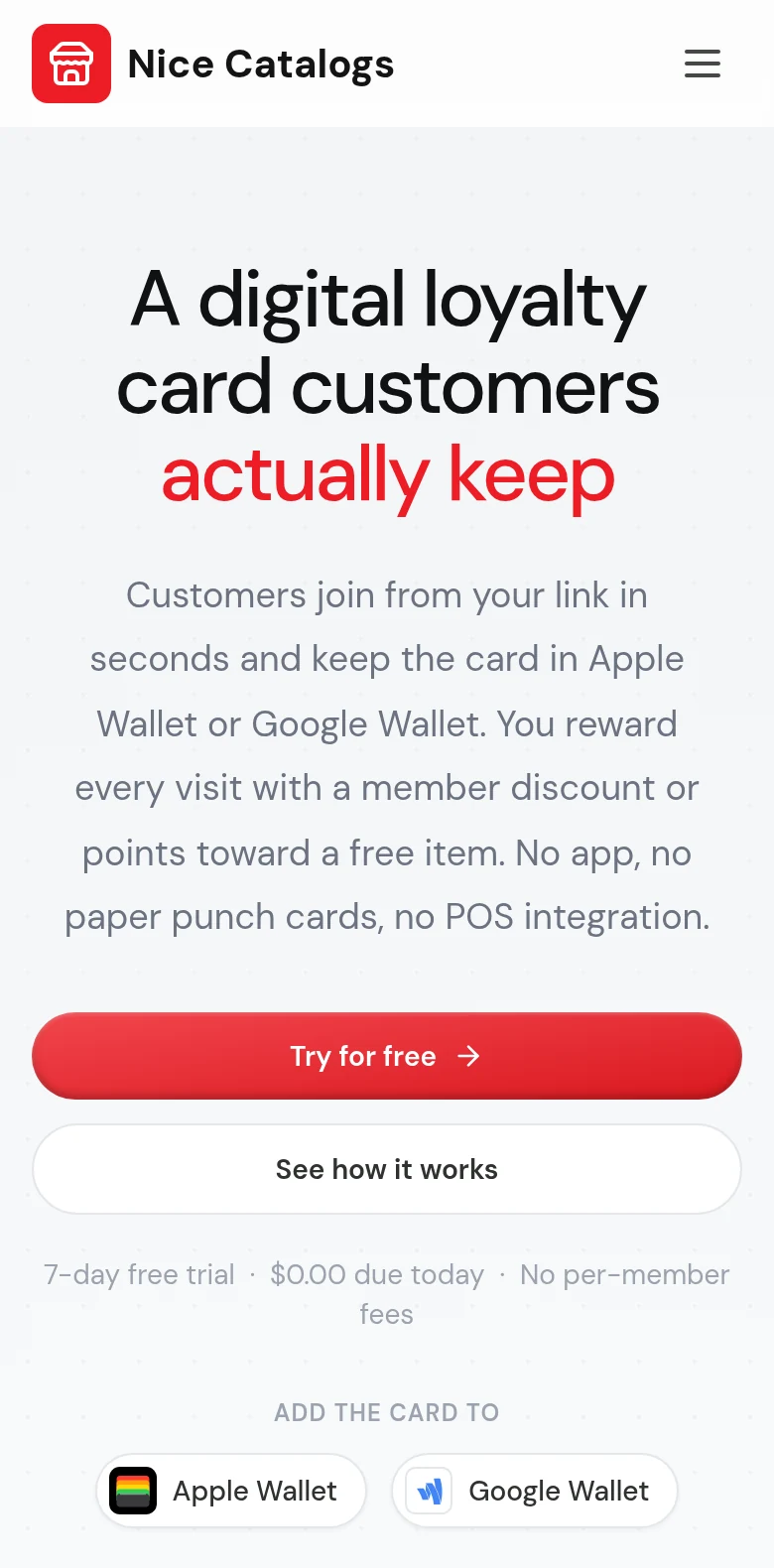
A no-app card skips all of that. The customer opens a link or scans a QR code, types a name and phone number, and has a card. Apple Wallet and Google Wallet are apps many customers already use, so a card saved there sits next to boarding passes and tickets without anything new to install.
How a digital reward card works without an app
Here's the full flow with Nice Catalogs, from the first scan to the reward.
1. The customer joins from a link
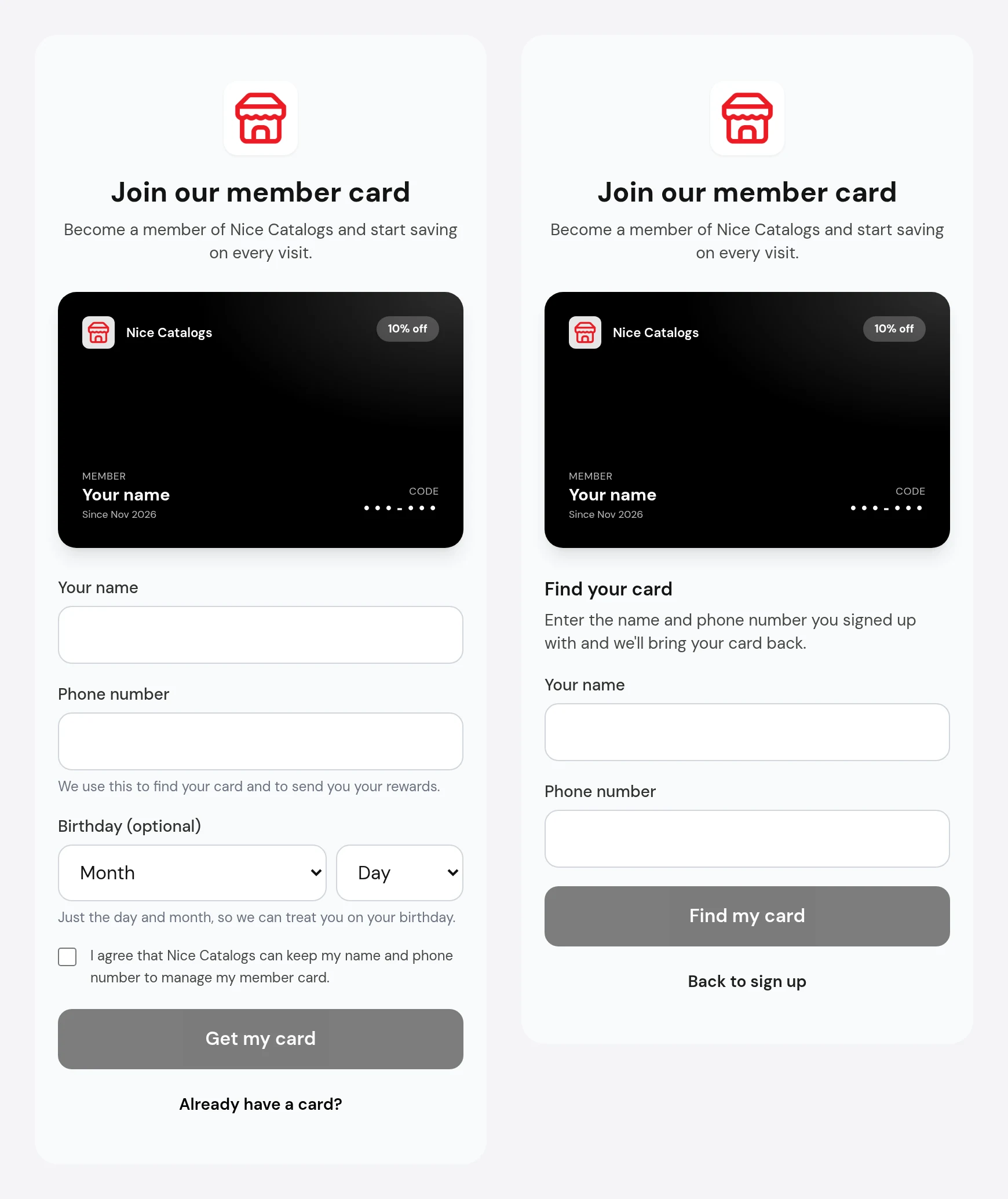
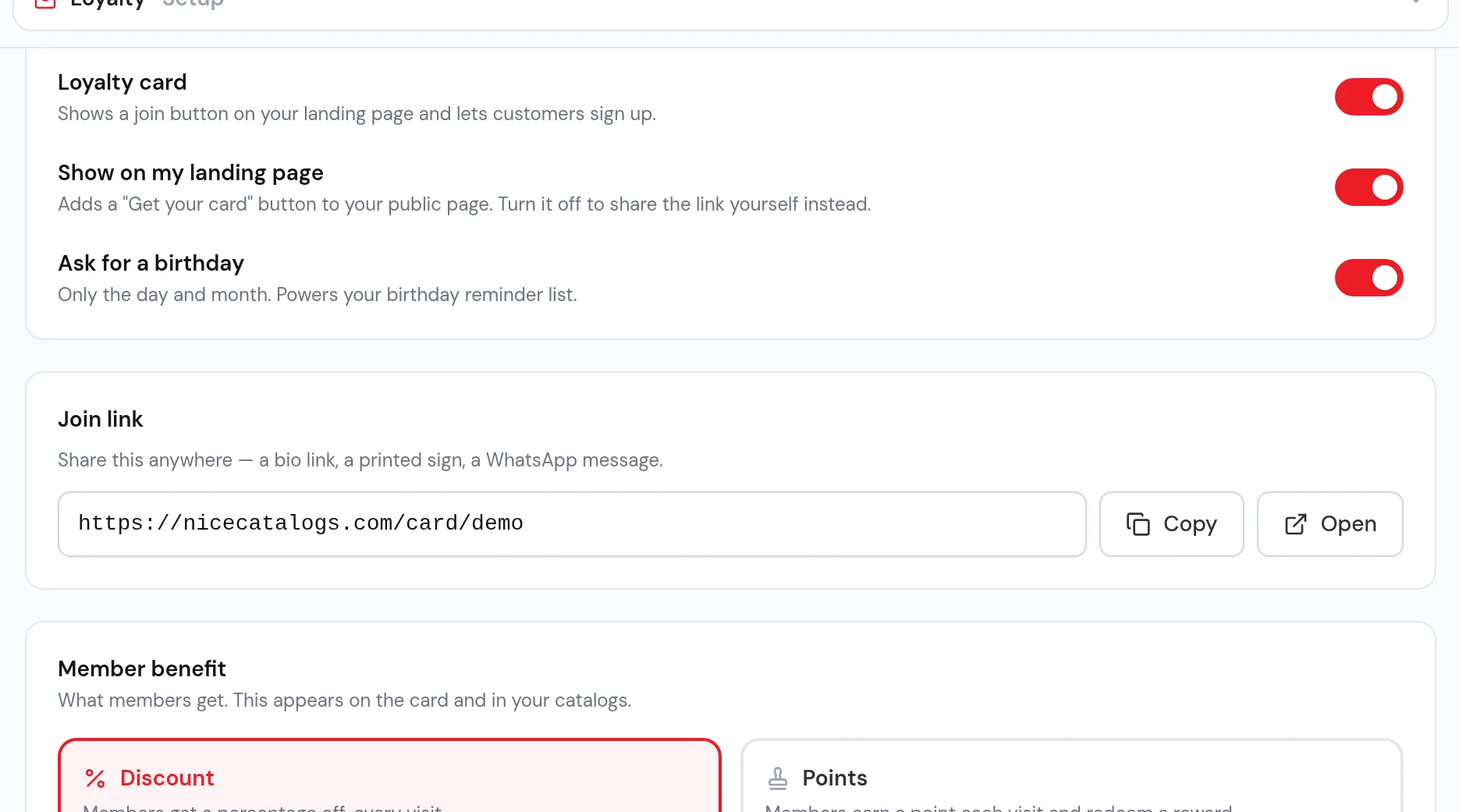
You share a join link. It can be a "Get your card" button on your link-in-bio page , a QR code printed by the till, or a link you send in WhatsApp. The join page asks for a name and a phone number. The birthday is optional and only asks for day and month. There's a consent checkbox so customers agree that you keep their name and number to manage their card. No email, no password, no app.
If someone clears their browser or changes phones, the "Already have a card?" link opens a "Find your card" form: they enter the name and number they signed up with, and the card comes back.
2. The card stays on their phone
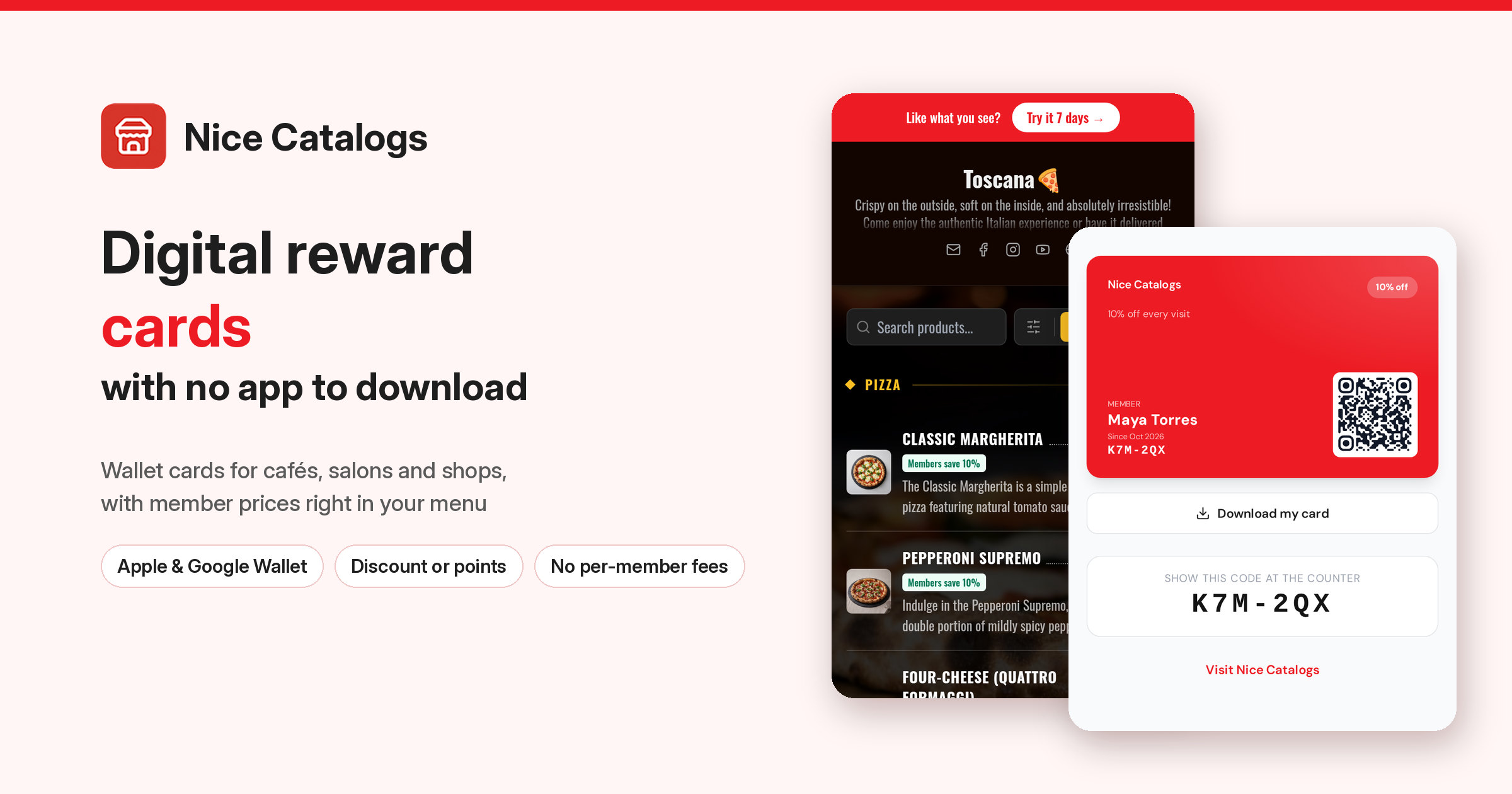
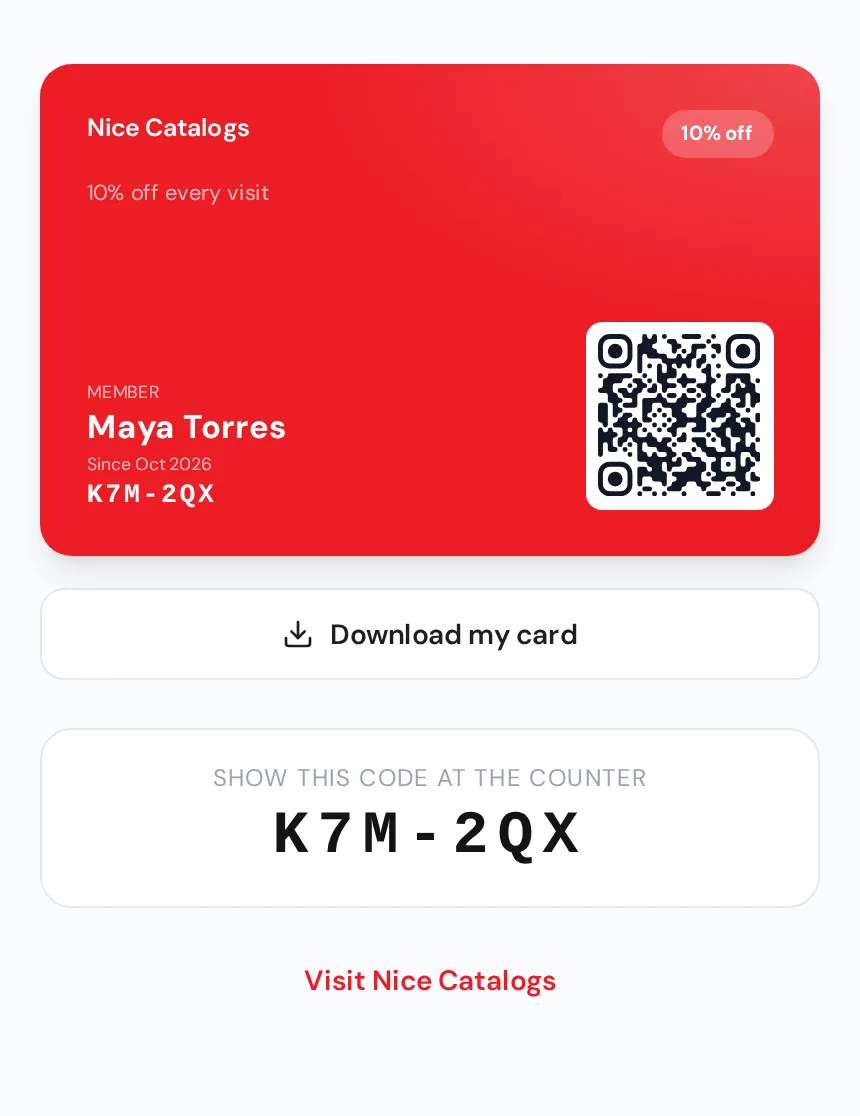
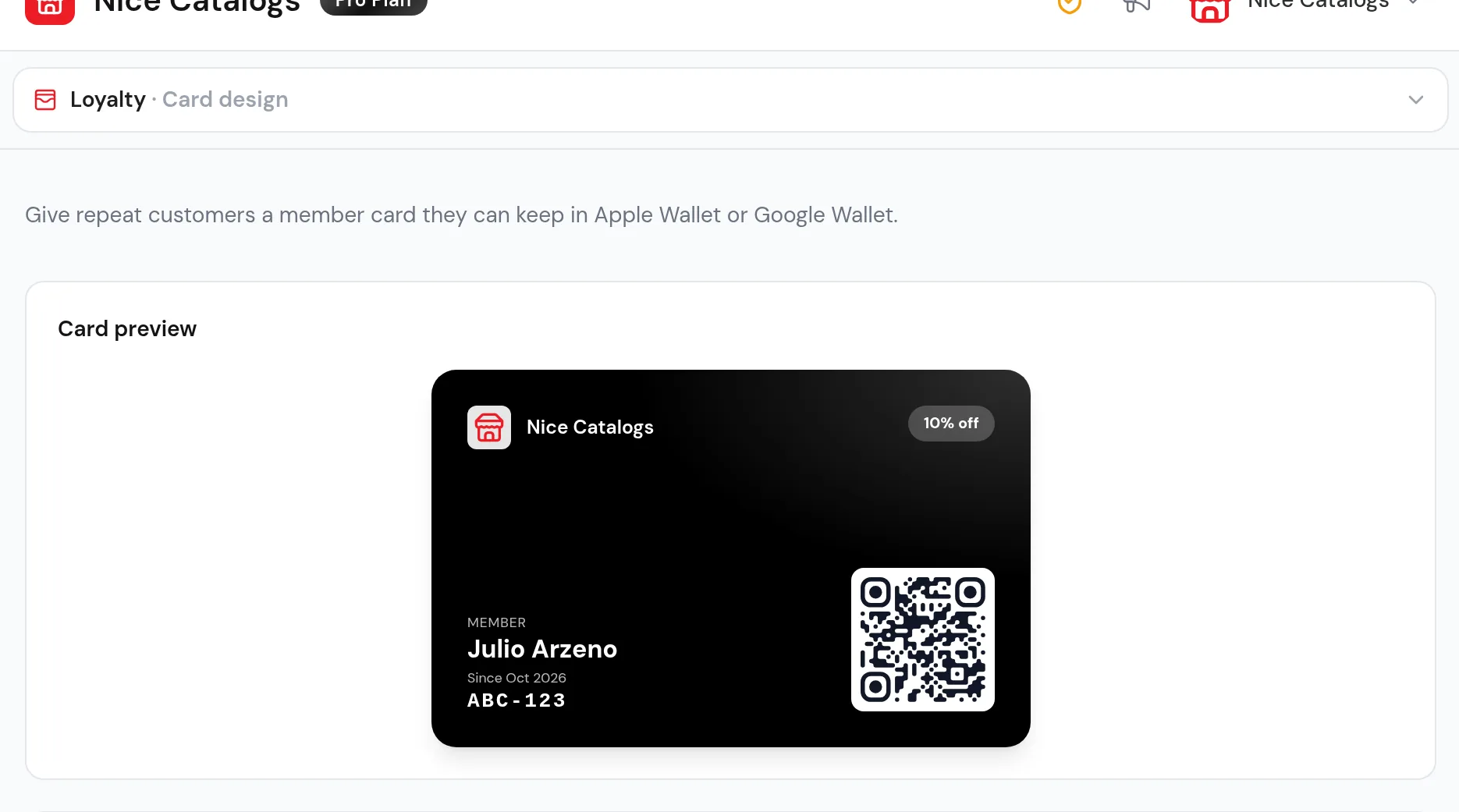
The card shows the customer's name, their member code and the benefit, such as "10% off every visit". Our loyalty page says they can add it to Apple Wallet or Google Wallet, or simply reopen the link whenever they need it.
3. At the counter, you look up the code
The customer shows their code and you type it into the Look up tab of your dashboard, then record the visit. On a points card each visit adds a point, and the reward is redeemed from the same screen. It works in the browser of any phone, tablet or laptop behind the counter, with no POS integration and no hardware.
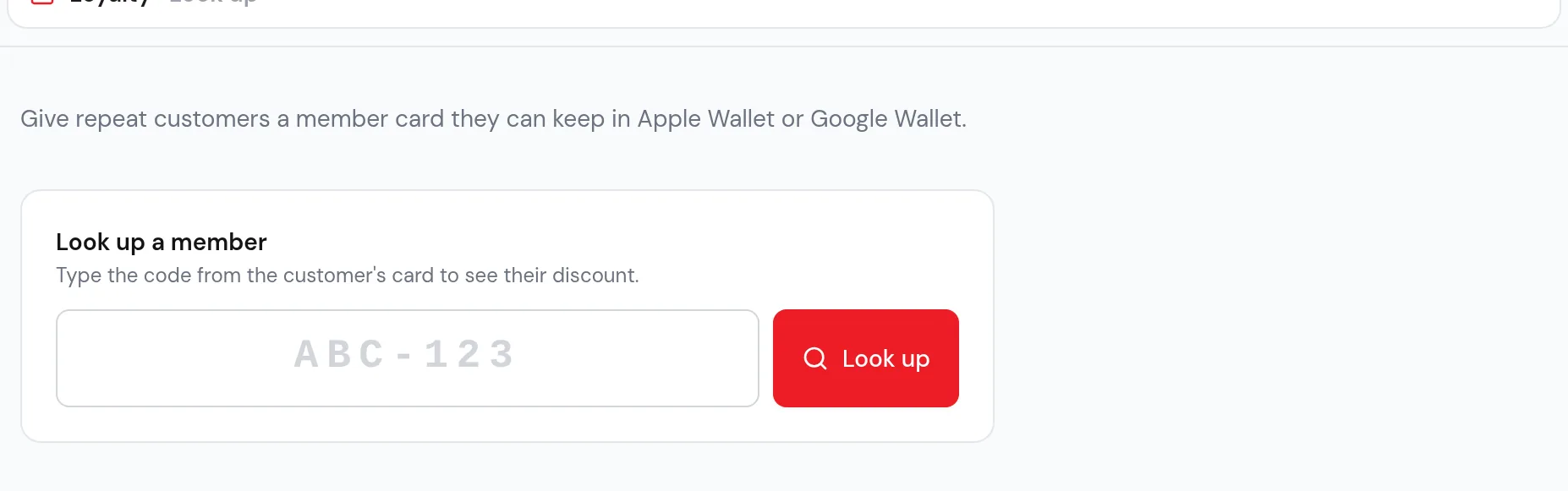
To be upfront: this is typing a short code, not scanning. For a café or salon with the same regulars every week it's quick. If you run several busy tills and want staff scanning cards with a phone camera, a dedicated loyalty tool may suit you better (see comparing tools below).
Points or a member discount: choosing your reward
You pick one reward type for the program, so the card and the counter screen only ever explain one thing.
- A flat member discount, for example 10% off every visit. Every member gets it on every visit, members see member prices across your catalogs, and you can exclude specific products from the discount.
- A points card, for example 8 points = a free coffee. Each recorded visit adds a point, the card shows progress, and you redeem the reward when the goal is reached.
How to choose:
- Cafés, bakeries and juice bars usually do well with points. Visits are frequent and small, and "two more coffees to a free one" gives people a reason to come back this week, not someday. See our page for cafes .
- Salons, barbers and spas often prefer a member discount. Visits are less frequent and higher value, so a steady percentage off every appointment feels fair. See our page for salons .
- Shops and grocery stores can go either way. A small member discount is easy to explain at the till; points work if you want to reward how often people come.
Keep the offer simple enough to explain in one sentence. You can change it later from the dashboard.
Where customers find the card
A reward card only works if regulars see it. With Nice Catalogs the card can sit in three places customers already visit.
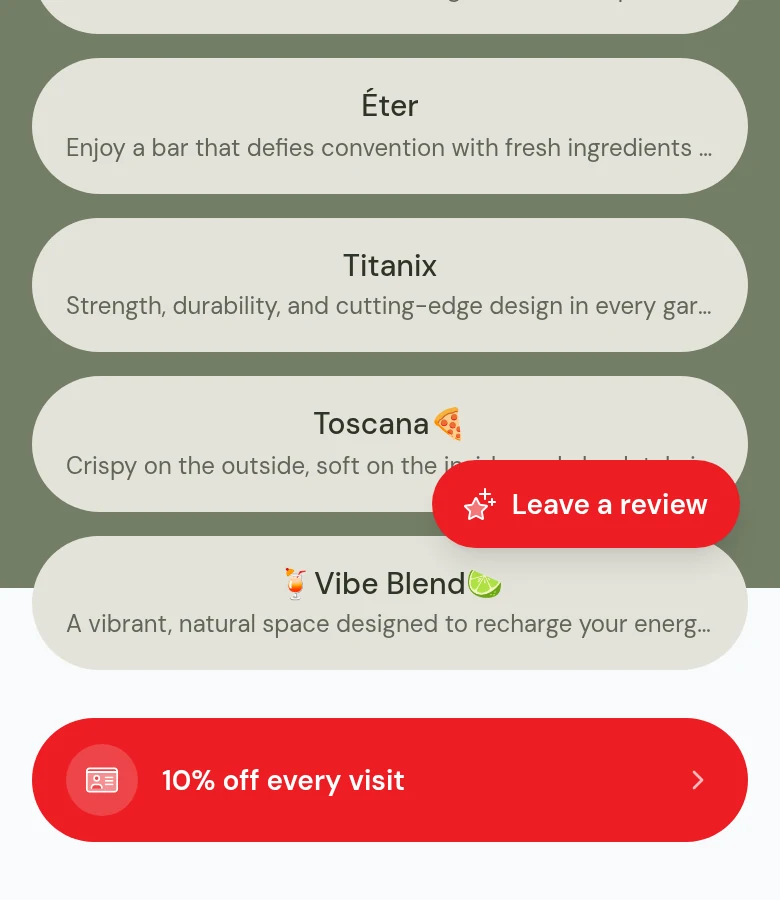
Your link-in-bio page. Turn on the loyalty card and the page shows a join button with your offer, next to your catalogs and menus. In our demo it's the red "10% off every visit" button.
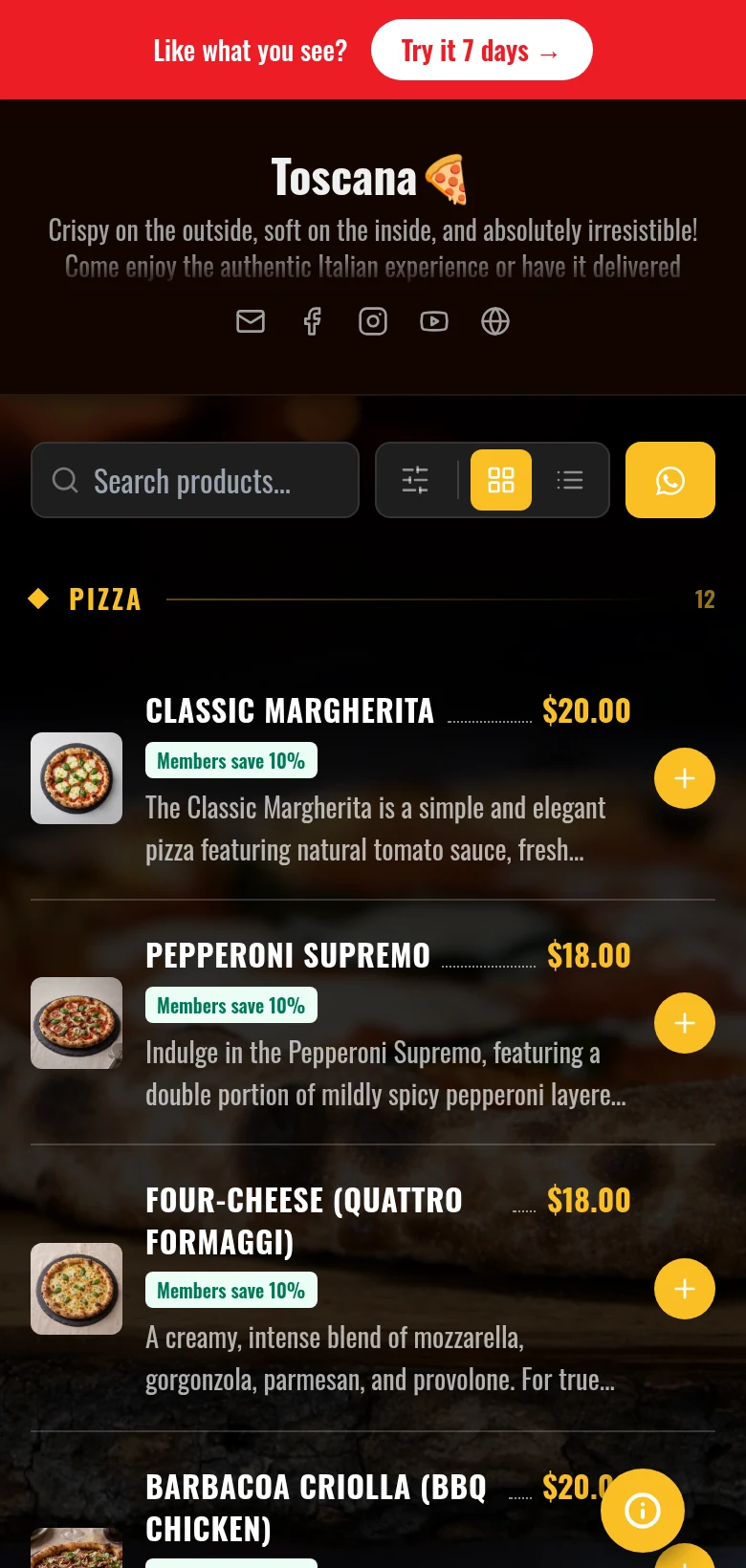
Your menu or catalog. On a discount card, your catalog shows the member benefit on products. Visitors who aren't members yet see what they could save, with a link to join, which turns a menu browse into a sign-up. Here's our Toscana demo menu with "Members save 10%" on each pizza.
At the counter and in chats. Print the join link as a QR code for the till or the table, and paste it into WhatsApp when you confirm an order or appointment.
Make it look like your business
The card uses your logo and your colours, and the dashboard shows a live preview of what customers get. Text switches between black and white automatically to stay readable on your colour.
Behind the card you get a member list with names, phone numbers, join dates and visit counts, searchable by name, phone or code, and you can block a card if you ever need to. If you ask for birthdays, the dashboard lists this week's birthdays, each with a one-tap WhatsApp greeting. That's the part a paper card can never do: you finally know who your regulars are.
Digital reward card vs paper punch card
Paper cards are cheap and everyone understands them. But compare the two after the first week:
- Where the card lives: paper ends up in a pocket or at home; the digital card is on the phone the customer always carries.
- Knowing your regulars: paper has no names or numbers; a digital card gives every member a name, phone number and visit history.
- Reaching them again: with paper, only when they walk in; with a digital card, a one-tap WhatsApp message such as a birthday greeting.
- Changing the offer: paper means reprinting every card; digitally you edit it in the dashboard.
- Checking a card is real: a stamp is easy to copy; a code you look up yourself is not.
Are there free digital loyalty cards?
People search for "free loyalty cards" and "digital loyalty card free" a lot, so here's a straight answer.
Our loyalty card is not free. It's part of the Professional plan at $10/month, or $8/month billed yearly ($96). The Basic plan ($5/month) doesn't include loyalty cards, and neither does the Free plan ($0, no credit card, 1 catalog with up to 25 products). There's no charge per member, per visit or per reward. You can start on the Free plan without a card. Professional has a 7-day free trial: you pick the plan and add a card, pay $0.00 today, and if you cancel before the 7 days are up you aren't charged and you stay on the Free plan.
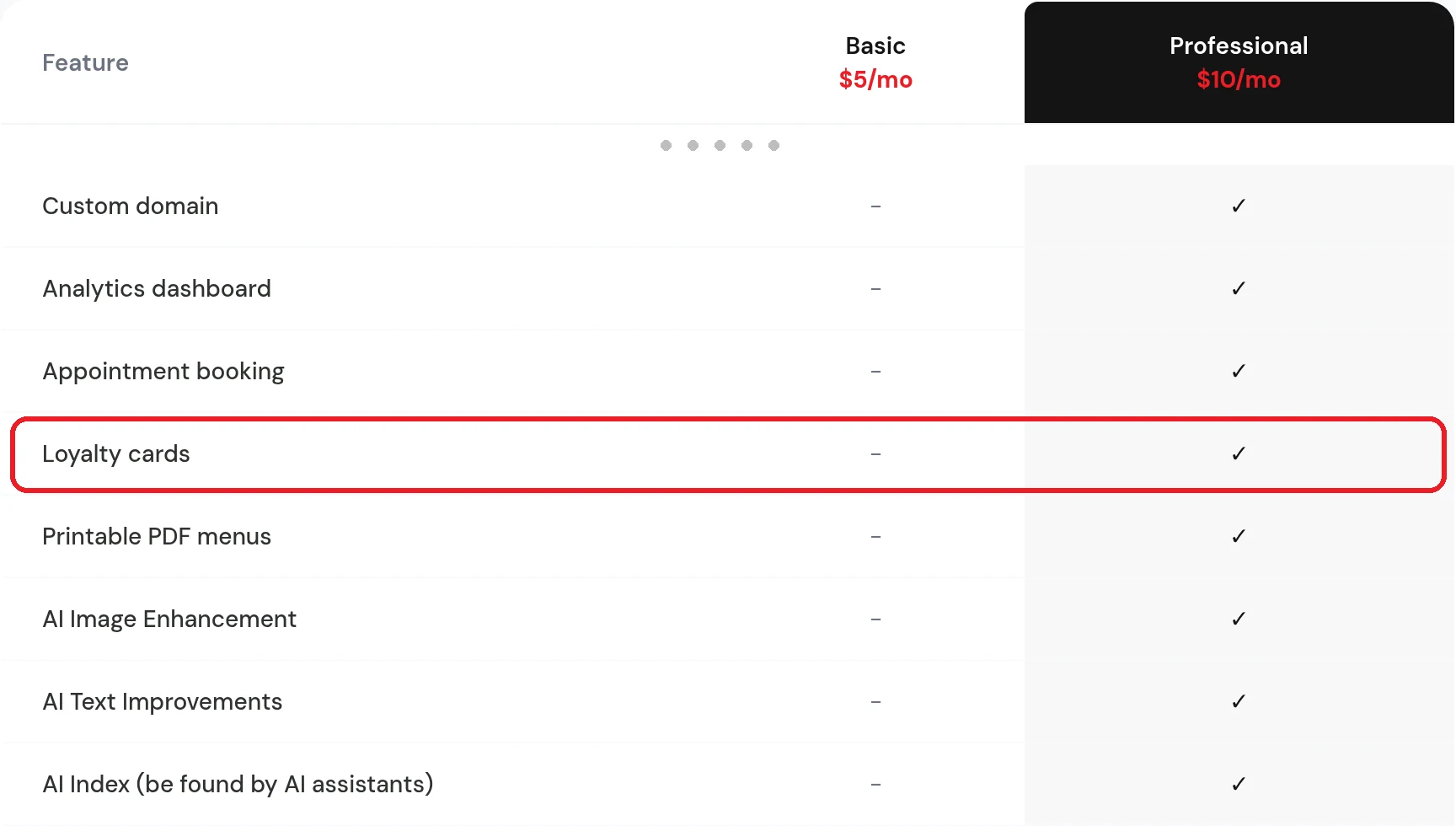
When you compare other tools, look past the word "free" and check three things: whether the free part is a trial or a plan, whether you pay per member or per stamp once you grow, and what happens to your members' cards if you stop paying. Those details matter more than the headline price.
What we can give you for free is the step that pairs best with a reward card: asking happy regulars for a Google review. Our free Google Review Link Generator gives you a direct link to your review box, a QR code to print and a ready-made message for text or WhatsApp. No sign-up, and the link keeps working even if you never use Nice Catalogs.
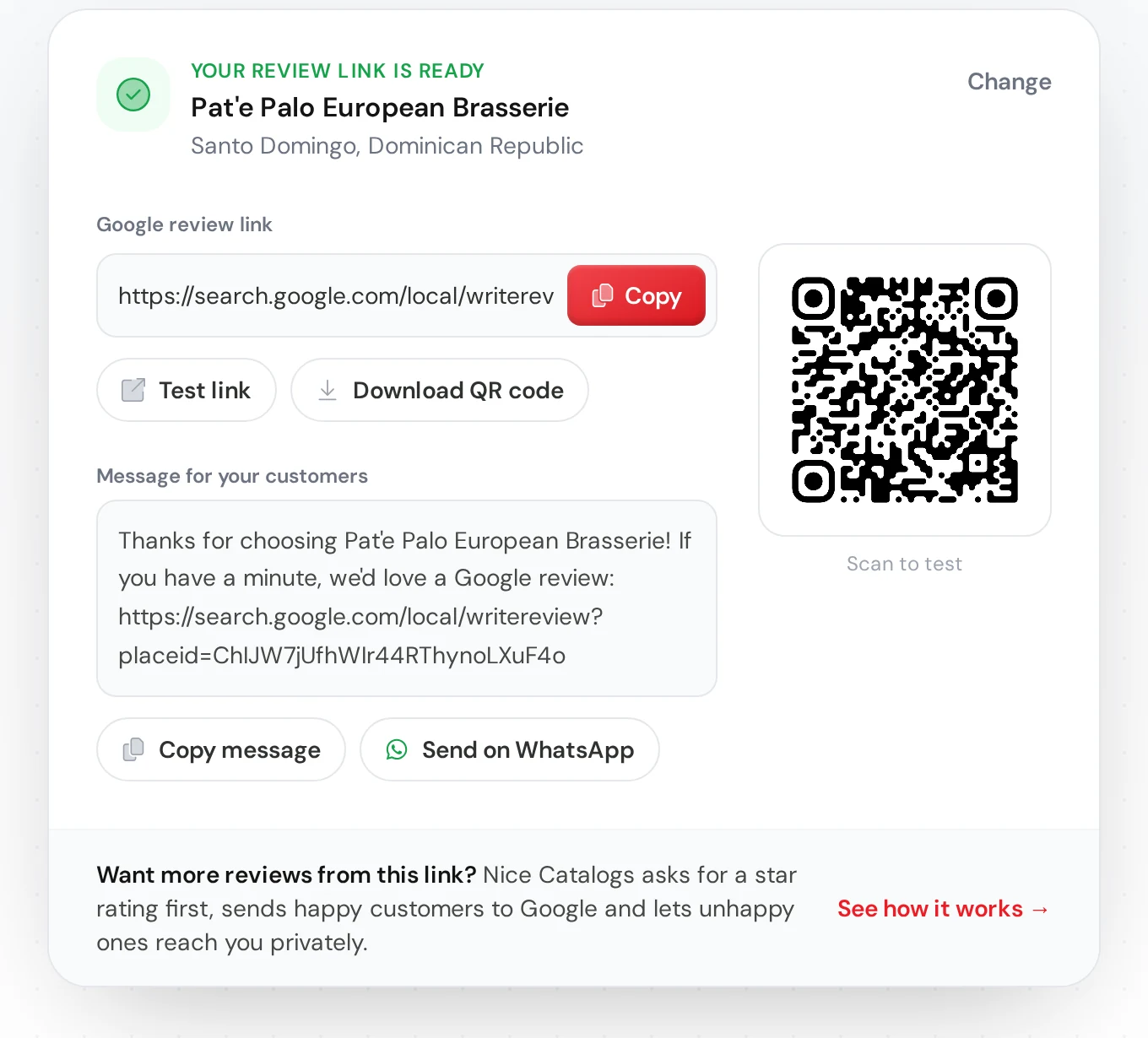
If you want the full system around that, see how review requests work in Nice Catalogs and our guide on how to get more Google reviews .
How to launch your reward card this week
- Pick one reward and write it as one short sentence: "10% off every visit" or "8 points = a free coffee".
- Design the card with your logo and colours.
- Put the join link where regulars already look: your Instagram bio, your menu, a QR code by the till.
- Ask at the right moment. The best time is right after a good visit, while the customer is paying or picking up.
- Tell your team the counter routine: ask for the code, look it up, record the visit.
- Send the link to your best customers on WhatsApp so your regulars are the first members.
If your menu or service list isn't online yet, set it up at the same time. Cafés can keep seasonal drinks current with a digital menu for cafés , and salons can put their services online with a digital catalog for salons and spas . You can also browse our live demo to see the bio page, menus and loyalty button working together.
Comparing reward card tools?
If loyalty is the only thing you need and you want features like camera scanning, push messages to card holders or several locations, a dedicated loyalty platform may be the better fit. We wrote an honest, side-by-side Loopy Loyalty alternative comparison with prices from both sites, and keep a shorter Nice Catalogs vs Loopy Loyalty table. Nice Catalogs makes more sense when you want a simple reward card next to your menu, your link-in-bio page and your review requests, in one plan.
FAQ
Do customers need to download an app for a digital reward card?
Not with Nice Catalogs. The card is a web page that opens from your join link, and our loyalty page says it can also be saved to Apple Wallet or Google Wallet. There's no app store download, no account and no password.
Are digital loyalty cards free?
Ours isn't. Loyalty cards are on the Professional plan at $10/month ($8/month yearly), with a 7-day free trial that needs a card and charges $0.00 today. There are no per-member fees. Nice Catalogs does have a Free plan to start a catalog, but it doesn't include loyalty cards. If you need something free today, a paper punch card costs only the printing, and our Google Review Link Generator is free.
Do I need a POS system or a scanner?
No. Nothing connects to your till. You type the customer's code into the Look up tab on any phone, tablet or computer and record the visit.
What information do you collect from customers?
A name and a phone number, plus an optional birthday (day and month only). No email address. The sign-up form includes a consent checkbox, and the details are visible only to you in your member list.
Is there a Spanish version of this guide?
Yes: Tarjeta de fidelidad digital para negocios pequeños covers the same card in Spanish.
Give your regulars a card worth keeping
Choose your reward, design the card and share the join link with your regulars. Read the digital loyalty card page , compare plans on our pricing page , or start the 7-day free trial .
Apple Wallet is a trademark of Apple Inc. and Google Wallet is a trademark of Google LLC; Nice Catalogs is not affiliated with or endorsed by either company. Loopy Loyalty is a trademark of its owner and is mentioned only to identify the product compared in our separate article. Prices and plans are as shown on nicecatalogs.com/pricing on November 9, 2026.